Reading time: 18 min read
Deep dive: SitecoreAI vs Sitecore XP & XM
The features and concepts that help SitecoreAI standout.
Start typing to search...
Besides being an overall multi-capability SaaS platform, the biggest idea in this comparison is what SitecoreAI unlocks around the platform. It has no shortage of AI-forward features, but the way it opens itself and its ecosystem to agents, applications and connected workflows is even more powerful when harnessed correctly. Fishtank (your best Sitecore partner, naturally) is leading that charge.
With FishtankOS, end-to-end orchestration and connectivity change how your team works in SitecoreAI. It is your intelligent marketing operations copilot: it connects SitecoreAI to the rest of your systems, understands what your team is asking for in Teams, Slack or Copilot, and delivers the coordinated, end-to-end execution people expect from AI. It can change how you work. You can see more of our thinking in our new ebook, The Agentic Frontier.
Beyond that, here's a summary of the other big differences.
As always, I'm happy to talk through your best path forward. Reach out to me at Fishtank and I will make time.
I will start by saying - SitecoreAI is an incredible platform. When I wrote my first version of this article in 2024, Fishtank had been involved in a dozen XM Cloud implementations. We have now delivered many more, migrated a pile of XP sites onto it, and built our own products on top of it.
I've updated this article. It began as a deep dive comparing Sitecore XP and XM with what was then called XM Cloud and is now SitecoreAI. It became something of a classic - famous enough to be ripped off by competitors - and a lot has changed in SitecoreAI since it was first published.
So let's bring it up to date. Let's get informed, make the right decisions, and do this.
But first - if you need help navigating the different versions of Sitecore and creating a path forward, or just want a quick chat, please reach out, I'm very happy to make time.
A few notes before you read the comparison:
Let's get into the breakdown.
| Feature | SitecoreAI | XP / XM |
|---|---|---|
| Content Management | ||
| Headless | Yes | Optional, Headless Services module |
| Structure content | Yes | Yes |
| Unstructured content | Yes | Yes |
| Multi-language | Yes | Yes |
| AI translation (item, page, whole site) | Built-in (docs) | No, but available with Sitecore Stream (docs) |
| Multi-tenant | Built-in | Yes |
| Multi-site | Built-in | Yes |
| Advanced Workflow | Yes | Yes |
| Signoff by Fishtank: multi-user, visual, integrated workflow approval | Yes | No |
| Content Editing & Creation | ||
| Visual in-page editing | Yes (super nice) | Yes |
| Drag & drop page building | Yes (super nice) | Yes, w/ SXA |
| No-code layout templates | Yes | Yes, w/ SXA |
| Low-code components | Yes | Yes, w/ SXA |
| SaaS component builder (Design Studio, formerly Components) | Yes (docs) | No |
| AI-generated component variants from a prompt | Yes (docs) | No |
| Streamlined editing interface | Yes | No (new editor on the roadmap) |
| AI writing assistant inside fields | Built-in, unlimited AI | No, but available with Sitecore Stream (10.2+) |
| Brand kit & brand assistant | Built-in | No, but available with Sitecore Stream Premium |
| Forms builder | Yes, simple forms with webhooks | Yes, deeply customizable, complex |
| AI & Agents | ||
| FishtankOS: end-to-end operations, marketing orchestration and execution | Yes | Available, not as full-featured |
| Agent workspace (Agentic Studio) | Built-in, 5 builder seats at Essentials (docs) | No |
| Prebuilt agents (Researcher, Content Generator, Translator, AEO/SEO Researcher, etc.) | Yes (changelog) | No |
| Custom agents, flows, spaces & signals | Yes | No |
| Official MCP server (Marketer MCP) | Yes (docs) | No (on roadmap) |
| Agent API / Agent SDK | Yes (dev portal) | No |
| Community MCP servers | Yes | Yes, unofficial (example) |
| Stream copilots (content, translation, brand) | Included | No, but available with Sitecore Stream |
| Marketing Features | ||
| Personalization | Included. Current visit plus 30 to 90 days of history; eighteen conditions out of the box, three of them cross-session (docs) | XP: Multi-Session; XM: In-Session |
| Page-level personalization | Yes, up to 10 page variants, 5 conditions per audience (docs) | Yes |
| Component-level personalization | Yes, decision table per component, since May 2026 (docs) | Yes |
| AI copy for personalization variants | Yes, AI rewrites the text inside a variant for the audience (docs) | XP: Legacy “Sitecore AI” add-on only. XM: No. |
| Custom personalization conditions | Yes, written in Page Builder; a Personalize licence is not required (docs) | Yes, custom rules in .NET |
| Sitecore Personalize (standalone product) | Separate licence. Its custom conditions appear in Page Builder and it lists your SitecoreAI experiences (docs) | Separate add-on, licensed on its own |
| A/B/n testing | Yes, component-level, up to 6 variants per test (docs) | XP: Yes - component, page, personalization and multivariate testing; XM: No |
| Campaigns | By Referrer / UTM | XP: Multi-Session; XM: In-Session |
| Profile / Personas | Affinities and audiences in Audience and insights (see Customer Data Platform) | XP: Multi-Session; XM: In-Session |
| Marketing Automation | No, agents and Connect cover parts of it | XP: Yes; XM: No |
| Email Marketing | No (Sitecore Send is separate; an Email Writer agent drafts copy) | XP: Yes (EXM); XM: No |
| Forms | Yes | Yes |
| Analytics | Yes, sites, forms and A/B/n tests in one Performance view | XP: Yes (xDB); XM: No |
| SEO tooling | Yes, plus an AEO/SEO Researcher agent | Basic (SXA) |
| GEO / AI search visibility (Scrunch) | Yes, via Scrunch, acquired June 2026 (press release) | No |
| Search | ||
| Site search included | Included (docs). Configure it in Page Builder with the Search Configuration Manager app and starter component (setup). Essentials includes 20,000 experience interactions per year (pricing guide). | No, bring your own. Algolia, Sitecore Search, Coveo, etc. |
| Search analytics | Yes, search dashboard in Analyze: views, clicks, CTR, null searches and a per-keyword table (docs). | No, bring your own |
| Merchandising controls (boost, bury, pin) | Yes, boost, bury and pin rules per source (docs). Synonym lists, redirects and blocking are not documented. | No, bring your own |
| Digital Asset Management | ||
| DAM included | Included at Essentials with 5 Power Users and 50 Consumers (pricing guide, Sitecore DAM). Full Content Hub is licensed separately. | Sold separately. The original Sitecore Content Hub product, different from SitecoreAI’s DAM. |
| AI tagging, alt text & visual search on assets | Yes, auto-tagging and alt text on upload, AI visual search (docs, visual search, changelog). Phased rollout. | No, but available with Sitecore Stream. Per-image Extract button: title, alt text, description, keywords (docs). |
| Public sharing links for assets | Yes, one public link per asset, with an optional end date (docs). | No, media is reachable by URL once published; no share links or expiry. |
| Connectivity & Extensibility | ||
| Webhooks | Yes | Yes |
| Content delivery API (GraphQL) | Yes, Experience Edge, included (docs) | Yes, on the CD server w/ Headless Services; Experience Edge for XM sold separately (docs) |
| API-based CMS administration (Authoring & Management GraphQL API) | Yes (docs, our API guide) | Yes, from 10.3, with Sitecore Headless Services installed and the API enabled on the CM server (docs) |
| Deployment API (projects, environments, deployments) | Yes, Deploy API (docs) | No |
| Edge administration API (delivery layer, cache) | Yes, REST (our API guide) | No |
| Layout Service | Yes | Yes (w/ Headless Services) |
| Marketplace apps (custom & public) | Yes (docs) | No |
| Custom fields in Page Builder from an app | Yes (docs) | Custom field types via .NET |
| Context panels & dashboard widgets from an app | Yes (extension points) | No (SPEAK / custom ribbon code) |
| Official UI component library (Blok) | Yes (dev portal) | No |
| iPaaS (Sitecore Connect) | Add-on | Add-on (Connect for XP, 10.4+) |
| Technology & Architecture | ||
| Development stack | JavaScript / TypeScript (Next.js, Content SDK) | .NET MVC, with headless optional |
| Back-end responsibility | Managed by Sitecore | Managed by you |
| Headless | Yes | Optional |
| Composable | Yes | No |
| Platform model | Unified: CMS, DAM, search, personalization, data and agents, API-first, SaaS | All-in-one monolithic DXP (no DAM or Search) |
| Hosting, Delivery & Performance | ||
| Hosting model | SaaS on Microsoft Azure | Self-hosted on Azure, AWS or your infrastructure |
| Infrastructure options | SaaS only | VMs, PaaS or containers |
| Front-end hosting | Bundled (Next.js) or bring your own headless host | Built-in .NET delivery or your headless host |
| Content rendering | Headless Next.js (Content SDK) | Traditional .NET MVC server-side rendering; headless via Headless Services (Next.js, etc.) |
| Rendering modes | Modern frontend: server-side rendering and static pre-generation with refresh (ISR) | Server-side .NET rendering; headless frontends bring their own SSR / SSG |
| Caching | Edge cache and ISR via Vercel / Netlify; page-level and granular component caching through the Content SDK (cookbook) | Sitecore HTML, render and output caching on the CD role, plus your CDN |
| Content delivery | Experience Edge plus the front-end host | Sitecore Content Delivery servers; Experience Edge optional for headless XM |
| Built-in CDN | Yes, Experience Edge for delivery (1 TB/month at Essentials) | No built-in CDN; configure your own |
| Scaling | Managed by Sitecore and the front-end host | Managed by you |
| Performance management | Managed service | Managed by you |
| DevOps & Operations | ||
| Environments included | 1 production + 2 non-production at Essentials | You provision them |
| Built-in deployment | Yes, Deploy app | No, bring your own pipeline |
| Automatic deploy on push | Yes (docs) | No |
| Preview deployments | Yes, via Vercel / Netlify | Custom |
| Blue / green releases | Yes | Custom |
| Environment variables & in-app logging | Yes | Use your own tooling |
| Operational hosting support | Included | Not included |
| Future platform upgrades required | No; front-end libraries still need maintenance | Yes (10.5 shipped August 5, 2026) |
| Automatic platform upgrades | Yes | No |
| Customer Data Platform | ||
| Customer data layer | Yes, included in every plan as Audience and insights, marketed as the Unified Data Layer (docs, Sitecore) | XP: xDB / xConnect, self-hosted. XM: No. |
| Visitor profiles & identity resolution | Yes, 40 sessions / 90 days per profile, phased rollout (docs) | XP: Yes, xDB contacts. XM: No. |
| Affinities & reusable audiences | Yes, Audience builder on profile, session, event and trait data (changelog) | XP: Profiles, patterns and personas in xDB. XM: No. |
| Profile import & data export | Yes, JSONL import and zero-copy export to Microsoft Fabric (changelog) | XP: xConnect APIs, custom-built. XM: No. |
| Sitecore CDP (standalone product) | Available under a separate licence and can be integrated with a SitecoreAI site through the Sitecore Cloud SDK. It remains distinct from SitecoreAI’s included Audience and insights customer data layer (integration docs). | Separate standalone product, with a looser integration implemented through Sitecore CDP’s SDKs and APIs. |
| Security | ||
| Trust Center available | Yes | Yes |
| Role & User-based security | Yes | Yes |
| Item & Field-based security | Yes | Yes |
| SSO Integration | Yes | Yes |
| SOC2 Certified | Yes | Yes |
| Security patching | Continuous, by Sitecore | You apply it (10.5 shipped four critical fixes) |
| Accelerators (Fishtank’s TIDAL) | ||
| TIDAL, Fishtank’s SitecoreAI accelerator | Yes | No |
| Industry-specific features (events, knowledge centres, account portals, SSO) | Yes, in TIDAL | Build or buy separately |
| Component library | 40+ WCAG 2.1 components in TIDAL, plus Blok from Sitecore | SXA components |
| Themeable | Yes, TIDAL components take on your brand | SXA themes |
| AI-forward, FishtankOS support out of the box | Yes | No |
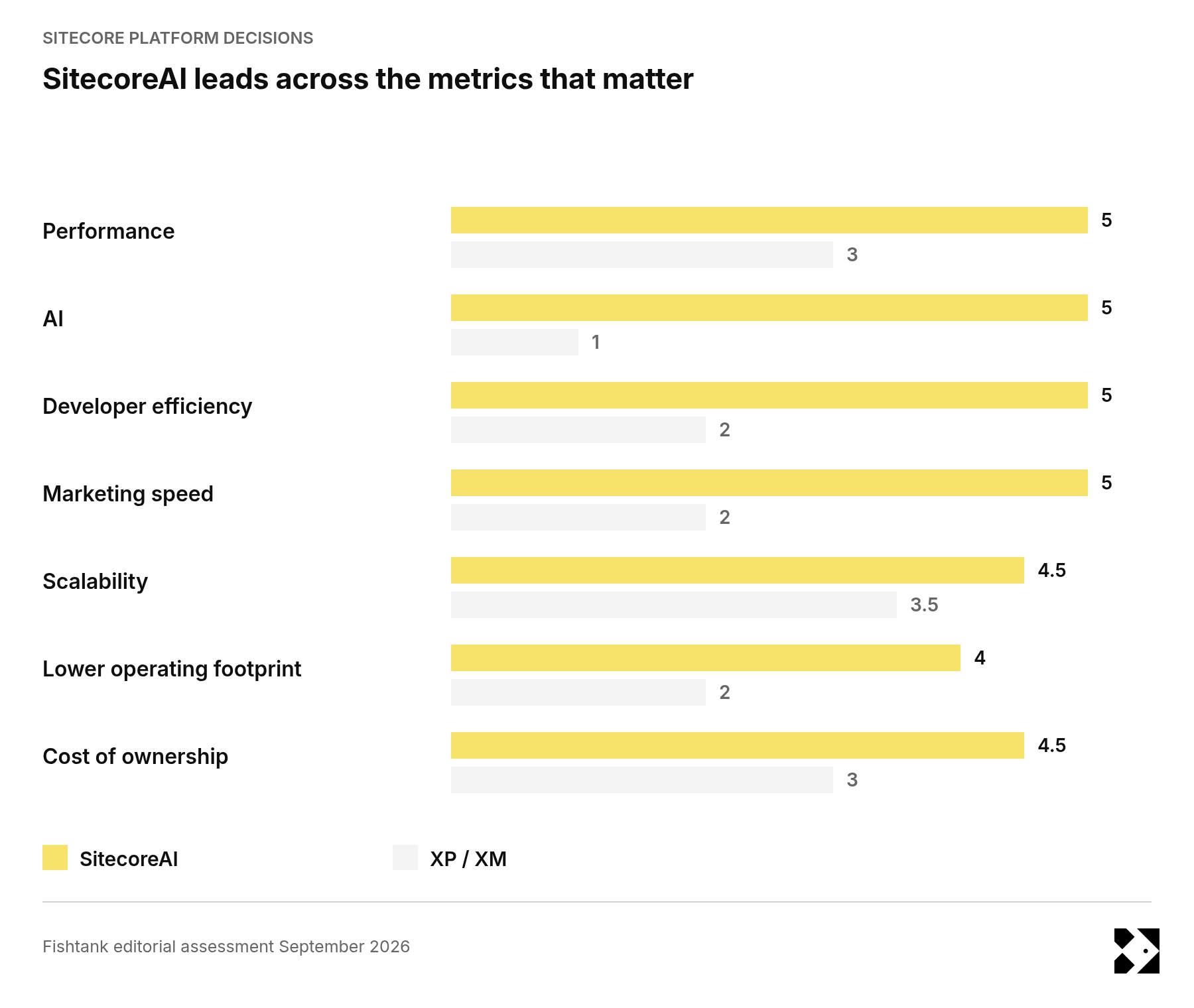
This chart is just a guess. What I think matters from here is how the platform changes your costs, your team's capacity and the work you can realistically get done.
SitecoreAI would be my starting point for a new website or a major digital initiative. For an existing XM / XP customer, the decision needs to account for the value of what you've already built, the total-cost of the transformation and the new value it can deliver for you.
Anyone who has dealt with traditional Sitecore XP / XM knows the world turns on these upgrades. IT pushes for compliance and support while the business is trying to get new features and improvements, and those can be significant projects.
This is a huge-impact feature, and it's a big time lift to the speed and performance of your business, with no upfront cost, investment of resources, or time and cost like you'd see in traditional projects.
Moving from hosting and managing your own infrastructure to a SaaS platform is a big shift in total cost of ownership, and the economics run deeper than the licence. The operating model is simpler to staff and faster to develop against, and marketers will get more done.
There's a lot to weigh here. Our SitecoreAI pricing and packaging guide covers the entitlements, and we're happy to work through the numbers with you. Contact us at Fishtank and we can help figure this out.
Sitecore XP and XM don't offer a compelling view into AI or AI-enabled teams. There's an older product called Stream, which is integrated sparingly, with quite small features, and all of them come at an extra cost. Compare that with SitecoreAI, which has its own internal flows, AI variants, and AI content creation and translation, all built in and available for use at no additional cost, which is quite nice.
The larger point for SitecoreAI is something I've called the agentic frontier, which we've talked about here at Fishtank. It allows multi-system, end-to-end orchestration, and it's a real generational leap in the work we can do with SitecoreAI, because the platform is fit for the ecosystem. Just can't do it the same on XP / XM.
We've explored this in our ebook, AI for you DXP.
I think traditional Sitecore XP / XM is very customizable, but that typically backfires. It can be customized to the point where migrations and upgrades are hard, and it can get you into a box. There's a lot of legacy knowledge in there, which can become a little difficult, but it's great. I think SitecoreAI landed on a better way.
So the practical result is a platform that stays reliable and current while still being extensible, without the upgrade pain that heavy customization creates. To bring this back to Fishtank's work, Signoff, our enterprise multi-user workflow tool, is a good example. We've been able to build great solutions like this on SitecoreAI for customers that we just couldn't build on Sitecore XP / XM.
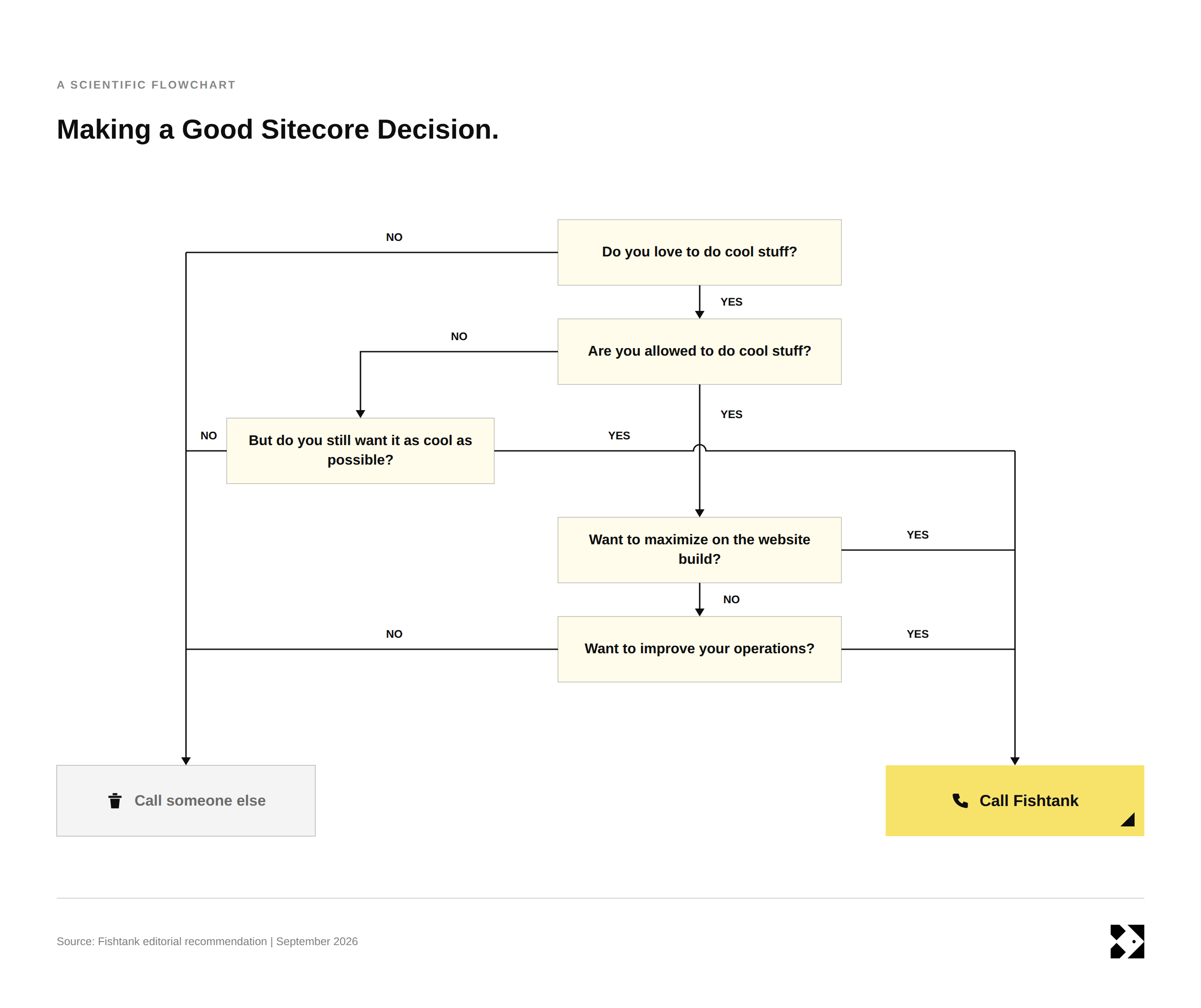
SitecoreAI is my default recommendation for a new investment. It's SaaS, it's simpler to develop on, and AI and extensibility are built in, so a team has more room to improve how it works. But let's chat it out.
Building a new website or planning a major redesign? I'd choose SitecoreAI unless a specific requirement rules it out. You're already funding a new experience at this point, so the architecture change can be part of the same project. I'd use the opportunity to improve content operations and integrations as well as the website, with a small number of measurable AI use cases from the start.
Running an XM / XP site that still does its job? I'd keep getting value from it while planning the next major decision. Existing MVC investment, important XP marketing workflows or infrastructure requirements can all justify staying. That still needs an active plan for support, security and improvement. Sitecore 10.5 is worth evaluating within that plan, subject to the modules and dependencies your solution needs.
Already committed to moving to SitecoreAI? I'd assess the minimum work needed to keep the existing platform secure and supported until the move. A large interim rebuild may duplicate spending, but an approaching migration doesn't remove today's operational risks. The useful decision is how to sequence the work so that each investment either protects the current service or carries into the next one.
Let me help you out.
If you want to see what the future of the DXP looks like, FishtankOS is a good place to start. To understand the agentic frontier, our ebook, AI for DXP, covers the thinking. And if you want a strategy for getting the most out of your existing platform, we've written about maximizing Sitecore XP and XM. Otherwise, happy to chat. Contact us at Fishtank and we'll help you figure it out.