Reading time: 12 min read
Sitecore 10.5 deep dive: Upgrade guide & what's new
A look at a very unique release.
Start typing to search...
Sitecore 10.5 was released on August 5, 2026 with new versions of both XM and XP. I've spent the past week working through the release notes, compatibility tables and Sitecore's own briefing to understand what this release really means for anyone planning an upgrade.
I'm going to walk through what's new, what might break, what's still missing and how 10.5 can fit into your planning. It isn't a feature-heavy release, but there's more going on than just the updated visuals.
And if you're weighing this against a move to SitecoreAI, Fishtank's guide to maximizing your long-term Sitecore investment is the companion piece to this one. We wrote it for the teams we work with who plan to stay on XM / XP for years yet, and the content still applies on 10.5.
Our goal is always to be the best Sitecore partner and provide all the information we can to help inform the market.
Open the Content Editor in Sitecore 10.5 and the black-and-red chrome that has framed Sitecore since the Sitecore 7 era is gone. That's history.
In its place is a lighter interface with a purple accent and flatter controls. If you've spent time in SitecoreAI (formerly XM Cloud), you'll recognize the design language immediately. Sitecore is implementing one design language across its products now, whether that's the OG product suite or SitecoreAI.
Here's a simple before and after:
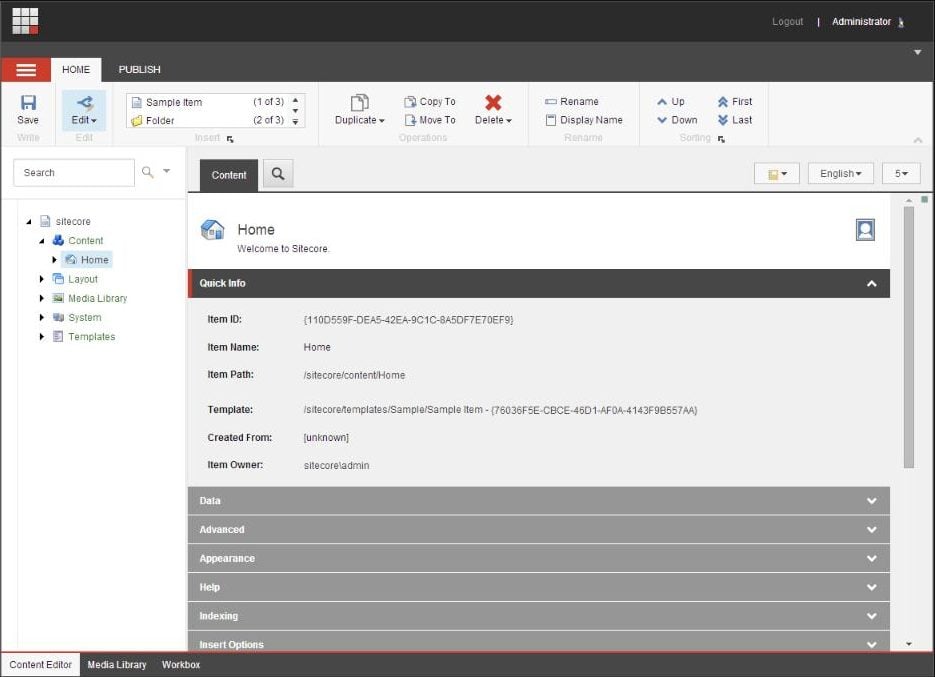
Sitecore 10.4 - the Content Editor most of us have been looking at for a decade.
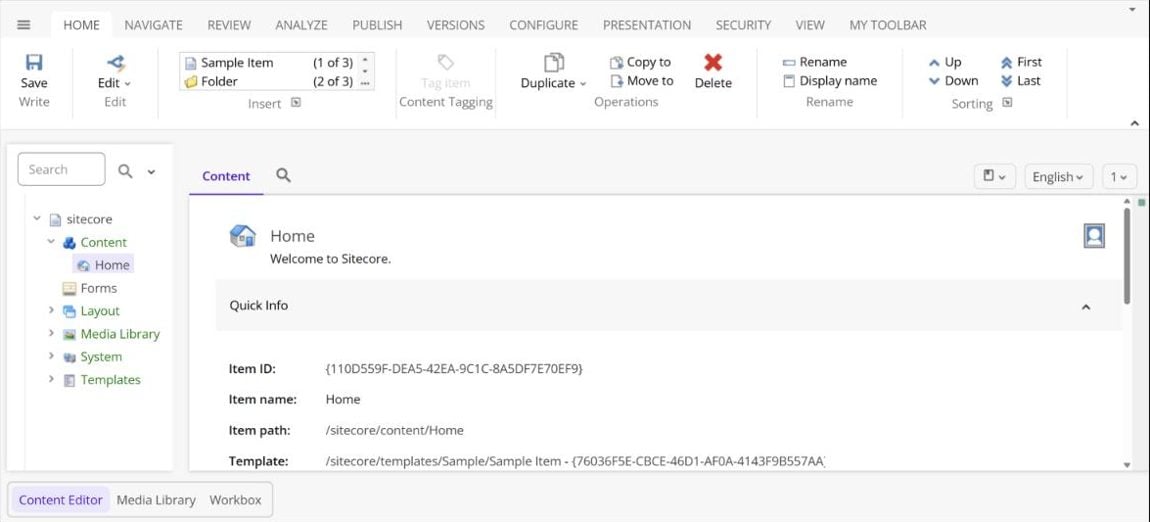
Sitecore 10.5 - light chrome, purple accent, and the full ribbon on display.
Red is out, purple is in. Long live Prince.
The new look will get your attention, but the more important story is what changed underneath it. Let's get into the security, performance and platform updates in Sitecore 10.5.
In Sitecore's release notes, four of the eight highlights are infrastructure changes, which tells you a lot about this release. Most of the work is about security, performance and moving customers onto supported versions of the technology underneath the platform.
If you're looking for new authoring, marketing or personalization features, there isn't much here. This release is mostly about making the platform more current, secure and stable.
The main thing to know is that Identity Server 9 now ships as its own module. In Azure, it deploys separately from the platform ARM templates, which means Sitecore can update it without tying every change to a full platform release. It supports Sitecore 10.3 and newer, runs on .NET 10 and adds Azure Entra ID for SQL authentication.
Okay, so let's get into whose stock is rising, whose is falling, and a few more specifics about what Sitecore 10.5 actually changes.
Sitecore added the 2025 versions to buy a longer lifespan before the next forced infrastructure move, and kept 2022 supported alongside them. If you're on 2019 today, you have two targets to choose from, which takes some pressure off the sizing.
Sitecore's deprecated features in XP 10.5 page covers three of these, and the rest are in the release notes. These are the ones most likely to affect your upgrade:
Sitecore documents sixteen breaking changes in 10.5. A few can stop a build; the rest affect configuration, infrastructure or runtime behaviour.
Here's how Sitecore framed it in their own words:
Relatively few breaking changes. Generally, they will have minimal impact on your solution. You will have a more secure and stable platform into the future. From a breaking change point of view, 10.5 feels like an update release.
The breaking changes page has the detail. I've pulled everything into the table below with a quick explanation of what each one means for your solution.
| Breaking change | What it means for your build |
|---|---|
| Solr 10 upgrade | SolrV8SchemaPopulate and SolrV9SchemaPopulate are removed for a single SchemaPopulateHelper. No backward compatibility path this time. managed-schema is renamed managed-schema.xml, which breaks deployment scripts that copy it by name. |
Telerik UI for ASP.NET AJAX upgrade | From 2020.3 to 2025.2, with new NuGet package identities and a licensing runtime assembly in bin. Sitecore.Kernel no longer references Telerik. |
BinaryFormatter replacement | Replaced with a JSON format. ObjectToBase64 and Base64ToHashtable return null, and FileUtil.LoadObject and SaveObject are deprecated. Scoped to package user accounts, serialized users and ClientData. |
| GraphQL Playground removal | ExposePlayground is gone from the settings interface and RegisterPlayground no longer exists in the owin.initialize pipeline. Re-anchor any config patch that referenced it. |
| Package Installer and Designer disabled by default | Sitecore.Packages.Disabled defaults to true on XP. Covered below. |
| Context site and security state for computed index | Computed index fields now preserve the calling thread's site context and security state. A custom IComputedIndexField that relied on security being disabled will behave differently. |
| Item Service Search API changes | Check any integration calling the Item Service search endpoints. |
| Toggle checking of duplicate name on publish | On by default. Items that would create duplicate siblings get skipped at publish time. |
| Sitecore Framework on .NET 10 | The side services move up. Identity Server 9 runs on .NET 10. |
| MVC rendering profiling and statistics | The RenderPlaceholder and RenderRendering profiling processors are disabled on Content Delivery servers. You gain throughput and lose rendering telemetry on CD, so anything that read those statistics in production stops reporting. |
| Device Detection default performance profile | The default profile changed. Revisit if you rely on device detection. |
| Security database schema changes related to Identity Server 8 | Your security database needs the updated scripts applied. |
| Removal of SQL Server 2019 support | SQL Server 2022 or 2025 only. |
| Legacy JavaScript and CSS library files removed | Check any custom UI that referenced the shipped legacy libraries. |
| Application Insights connection string requirement | An instrumentation key on its own is no longer enough. A connection string is required. |
| Messaging SQL database and connectivity changes | The messaging database and its connection configuration changed. |
This is still the summary version. It should give you a useful place to start, but I would go through the full breaking changes page against your own solution before you put dates around the upgrade.
The new setting is Sitecore.Packages.Disabled in Sitecore.config. On XP it defaults to true. Earlier versions defaulted to false, so this is a change you'll need to account for when upgrading. To turn it back on, deploy the supplied patch file App_Config/Include/zSitecore.InstallPackage.Enable.config, which sets it back to false.
There are real exploits that rely on uploading executable code, so turning the installer off by default is the more conservative approach. I guess the idea is to turn it on as part of your release cycle, use it for what you need, then turn it off again.
Sitecore is clear that not every supporting module has a 10.5 release yet. On the 10.5 download page, they say:
Following Sitecore modules are currently undergoing compatibility verification for Sitecore Experience Platform 10.5. Support for these modules will be introduced in upcoming module releases.
The seven modules still going through compatibility verification are:
Sitecore has said the remaining module updates are expected before the end of September, with releases continuing through the quarter. There are no firm dates, so if your upgrade depends on any of them, I'd think about late September or October.
I also couldn't find explicit 10.5 support yet for Sitecore CLI or Sitecore Management Services. Both are broadly compatible across Sitecore 10 releases, so they may work as-is, but I'd still include them in your testing until 10.5 support is formally listed.
Check the Sitecore module compatibility table before setting your upgrade date.
If you're running Stream on XP (and there aren't many of you), it needs its own 10.5 build before it will work. Sitecore has confirmed one is launching soon with a new UI.
The 10.5 build is also expected to bring two useful changes. You'll be able to translate a parent item and all of its descendants in one operation, and Stream will respect the Content Editor's field validation rules. That means things like maximum length and text case should carry through to what the LLM returns.
Sitecore has published the dates. The lifecycle table now carries a 10.5 row: mainstream support to December 31, 2029, extended to December 31, 2032, and sustaining to December 31, 2034.
That's the usual pattern holding, which is mainstream through the end of the third calendar year after release, extended for three years beyond that, and sustaining for two more. You can plan against these numbers.
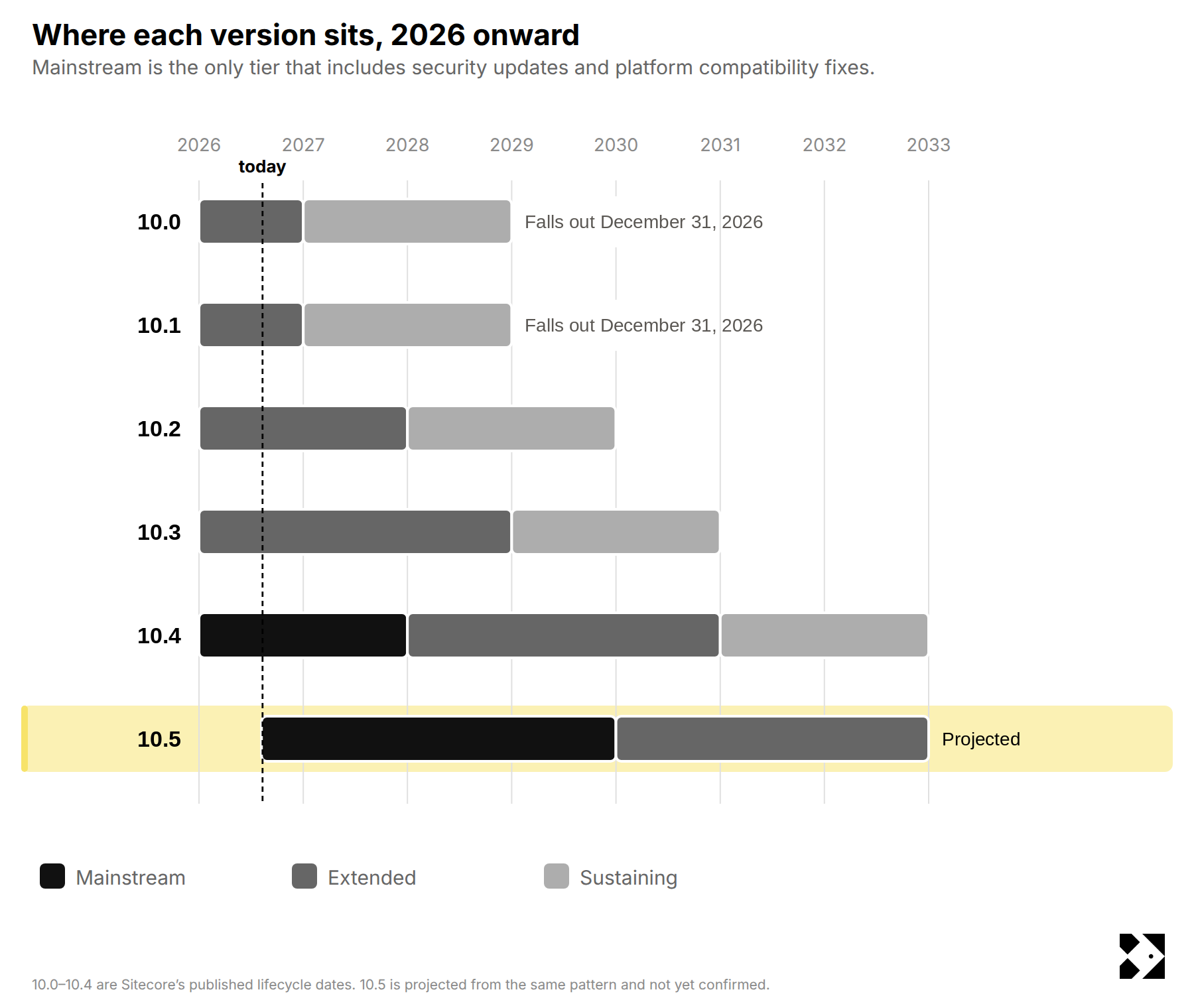
As of June 1, production incident assistance and security updates both moved from included to paid inside Extended Support. If you're on 10.2 or 10.3, that's you. December 31, 2026 is the date to circle, when 10.0 and 10.1 leave Extended Support entirely.
We covered all of it version by version in our Sitecore 2026 support changes article.
On Sitecore 9? You're out of support. 9.0 and earlier ended December 31, 2025, and 9.1 through 9.3 sit in Sustaining Support, which includes zero security patches at any price. If you're running 9.x in production you're running unpatched today. Sustaining ends December 31, 2026 for 9.1 and December 31, 2027 for 9.2 and 9.3.
On 10.1 or 10.2? You've already paid for close to five years of Sitecore product investment you've never used. Roughly four hundred documented fixes once you count 10.3, 10.4 and 10.5 together, plus a long list of capability sitting on the other side of the upgrade. Even if your platform is stable and nobody's asking for an upgrade, that's worth collecting, because you're funding it either way.
On 10.4? The support cycle is the argument, and it carries on its own. Nothing here forces your hand this quarter, and the timing is under "Should You Upgrade to Sitecore 10.5" below.
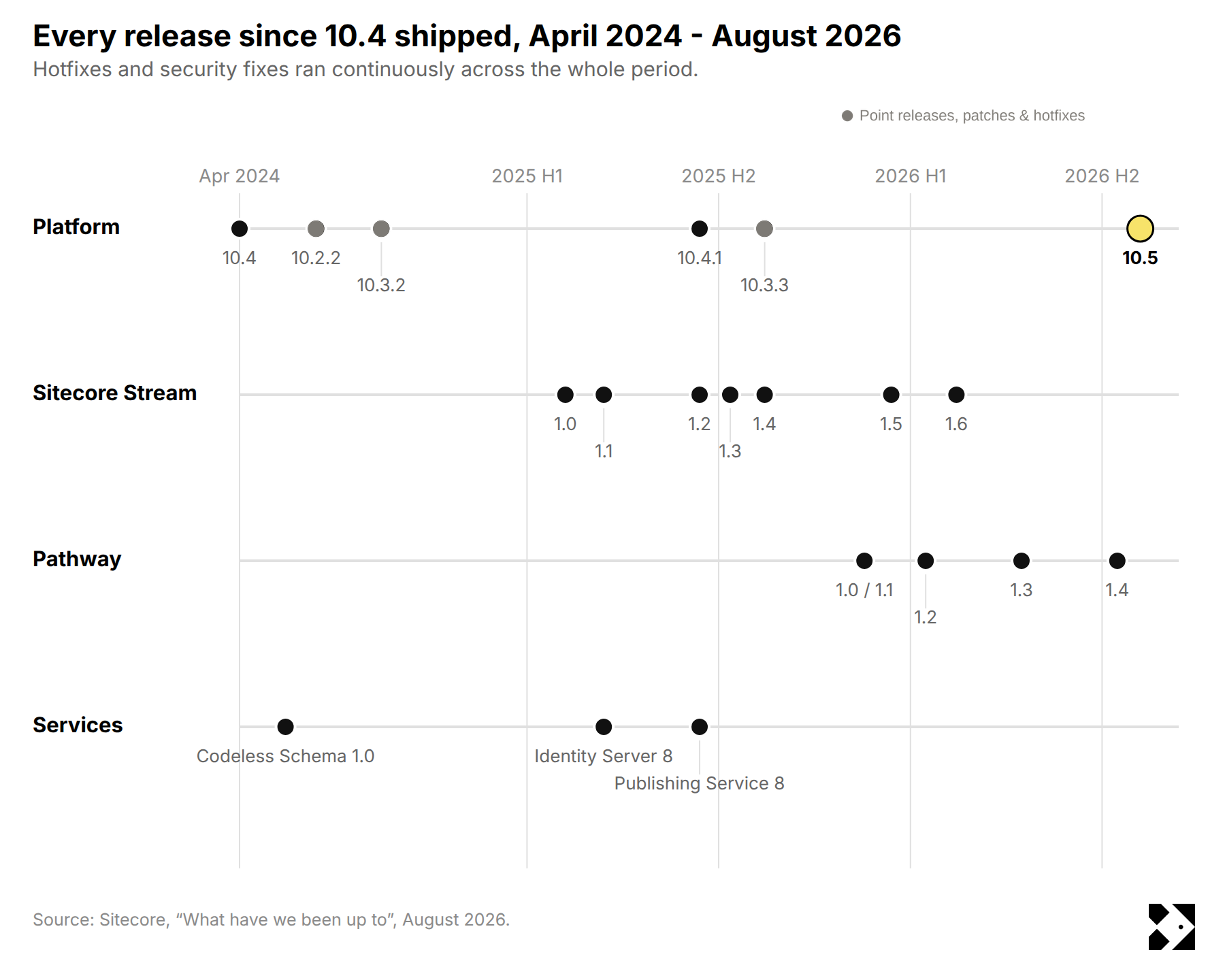
From my point of view, these are the biggest gains you get from modernizing and moving from Sitecore 10 up to 10.5. They're not necessarily specific to 10.5, but they're things you pick up along the way.
Headless SXA and the GraphQL APIs are what change the work you can do. Together they let you modernize your front end without tearing down the back end, and they get you building much closer to the way SitecoreAI works. If SitecoreAI is anywhere on your roadmap, that front-end effort carries forward when you move.
Isn't this the million-dollar question? Should you or shouldn't you be thinking about this upgrade? I'll give you a quick run-through of my thoughts.
No panic. You're in mainstream support through December 31, 2027, so start planning and move once the modules you depend on have shipped. The two extra years on the other side are now confirmed, so you can put them in the business case.
You should definitely be considering it. Your mainstream support ended in December 2025, so you're in Extended and paying separately for security updates. 10.5 is the cleanest route back into mainstream, subject to the security database scripts shipping.
Yes. Get a path to upgrade in place, or start planning your migration to SitecoreAI. 10.1 leaves Extended Support on December 31, 2026, and if you're on 9.x you're already unpatched. Scope it now and expect to execute once the pending modules land.
You can go straight to 10.5 from 10.2 without stepping through 10.3 and 10.4. That's one project instead of three, and it's the biggest thing working in your favour on sizing.
If the move is signed off and happening inside the next twelve months, put the budget there. Sitecore's guidance matches ours: an interim XP upgrade right before a migration is money you spend twice. If it's further out than eighteen months, you still need a supported platform in the meantime.
On new features, 10.5 is an underwhelming upgrade.
Look at the security debt underneath it, though, and the picture changes. If you're on an older version of Sitecore and plan to stay on XP, getting to 10.5 gives you the longest support runway available. That's about two more years than 10.4, which could buy your organization some useful time before the next major platform decision.
If you're staying on the Sitecore platform rather than migrating to SitecoreAI, we've written a lengthy guide on Maximizing Sitecore's potential over the long term. Please check it out.
As a top Sitecore partner, we're always working to keep our clients current, secure and getting full value from the platform they own. Please contact us at Fishtank for an open and honest conversation about your Sitecore upgrade.