Reading time: 14 min read
The future of AI, DXP platforms and micro frontends
By Dan Cruickshank — June 4, 2026
Start typing to search...
If you've been in this industry long enough, you start to see the cycles. Micro Frontends are following a familiar path—resurfacing with better tooling and higher stakes. For years, they were purely the domain of engineering—a technical solution to stop the frontend monolith from crushing velocity.
But I have this theory. I believe the unique confluence of Generative AI, Digital Experience Platforms (DXPs), and Micro Frontends is about to trigger a massive wave of innovation.
We are seeing a new possibility emerge where Micro Frontends are no longer just an architectural style for developers—they are becoming the substrate that allows AI to build the web. This is the critical shift. It opens the door for marketers and non-technical teams to solve problems that previously required a six-week engineering sprint.
Before we get into the "how," let's get our definitions straight. There is a lot of noise out there, so here is the signal.
When I talk about a Digital Experience Platform (DXP), I'm talking about tools like Sitecore. These are the platforms where marketing and operations teams actually work. Developers build for them so that marketers can create the web presences and digital platforms that interact with customers. It's the engine room of your digital strategy.
We aren't talking about the "machine learning" of five years ago—statistical models and recommendation engines. We are talking about Generative AI and Large Language Models (LLMs). This is the inflection point. We have moved from AI that analyzes to AI that creates.
Explore the differences in Traditional AI vs. Generative AI.
Historically, a website was a "Frontend Monolith"—one massive codebase, one technology stack, one big pipe with a lot of hands in it. If you wanted to change the header, you risked breaking the footer.
Micro Frontends change that. It's an architectural style where a website is composed of distinct, autonomous applications.
They look like one website to the user, but under the hood, they are separate pieces that can be built, deployed, and managed independently.
Micro Frontends provide the safety for a new kind of builder—marketers and non-coders—to pull up a seat at the table. When you couple this architecture with Generative AI, it becomes the substrate for doing some truly incredible things. That is the real opportunity in front of us.
To understand where we are going, you have to understand the problem we have been trying to solve for the last decade.
To this day, we still build "Frontend Monoliths." These are singular, colossal codebases responsible for the entire user experience. This problem is very present with large technical teams working together at scale.
If you have a team working on the checkout flow and they introduce a bug, they can take down the entire homepage. Everyone shares the same risk surface—a single failure point for every team.
The industry's answer to this was Vertical Decomposition.
Instead of organizing teams horizontally (e.g., a Database Team, a Backend Team, and a Frontend Team), we started slicing the application vertically based on business capabilities.
This isn't just a technical change; it's an organizational one. As this approach makes development easier and more autonomous, you can start to see how we might want to bring marketers or technologists directly into this vertical decomposition stack.
In my research for this, I came across something called Conway's Law, which I think is very relevant to digital platforms and creations.
"Organizations which design systems are constrained to produce designs which are copies of the communication structures of these organizations."
You can often see this at a micro scale within an organization's website where its navigation reflects the organization's structures. That menu is a system designed specifically to reflect the internal hierarchy. If teams don't communicate, they probably have separate fiefdoms on the site's navigation.
Traditional architectures really require us to have high-bandwidth communication. The whole organization's capabilities have to pass through one big knot of code that includes marketing, development, and business development. Any part of the business represented on the website becomes dependent on these resources and is constantly in a resource negotiation.
Micro Frontends align your architecture with your desired organization. By decoupling the code, you decouple the teams. You restore autonomy. It means the Search team—or even marketers armed with Gen AI—can safely ship new features without asking the Payments team for permission.
Now that we understand why Micro Frontends exist, let's look at how they actually function—and what AI needs to build into them.
Think of a typical page on your website. At the top, there's a header with the logo and navigation. Below that, maybe a hero banner. Then a content area—product cards, a search bar, a promotional widget. At the bottom, a footer.
In a monolith, all of this lives in one codebase. Change the promo banner, and you risk breaking the header.
In a Micro Frontend architecture, each of these areas is independent. The header is one package. The promo banner is another. The product grid is another. They all mount into the same page, but they do not share code—and they do not share risk.
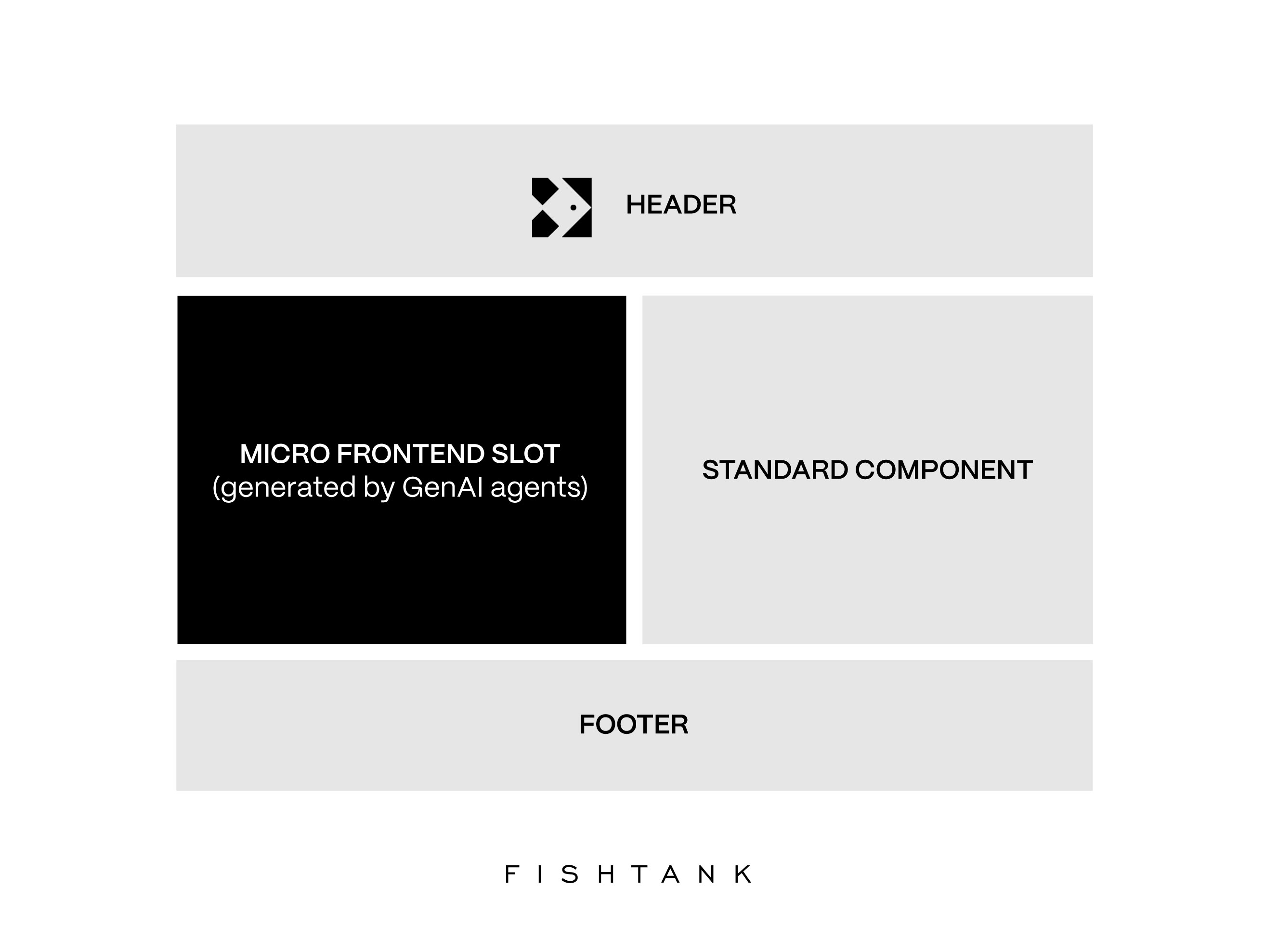
How it loads: When someone visits the page, the "container" loads first—this is the outer frame that holds everything. Then it fetches each piece and drops it into place. If the promo widget fails, the rest of the page still works. Each area is its own protected channel.
The "slot" is a concept. But what actually enforces the boundary? Several browser technologies can act as the harness—the gateway that keeps each Micro Frontend isolated from the others.
Web Components (Shadow DOM)
This is the browser-native solution. A Web Component ships as a self-contained package—its own HTML, styles, and behavior, all isolated from the rest of the page. Under the hood, a concept called the Shadow DOM creates the boundary. CSS from the main page cannot leak in, and CSS from the component cannot leak out. It is isolation built into the browser standard.
iframes
Generally frowned upon, but truly the original isolation mechanism. An iframe is a completely separate browsing context—its own DOM, its own JavaScript scope, its own styles. If you need bulletproof isolation (especially for third-party or untrusted code), iframes remain the strongest boundary. The tradeoff is performance and communication overhead. It's still common for us to use these as part of embedded payment gateways for many customers.
Module Federation
This is not about isolation—it is about loading. Module Federation allows the shell to dynamically import code from other applications at runtime, as if they were local files. It handles shared dependencies (so you do not load React twice) and enables independent deployment. The isolation still comes from how the loaded code is mounted—often into a Web Component or a sandboxed container.
The Key Insight: These technologies are not mutually exclusive. A modern Micro Frontend architecture might use Module Federation to load a component, wrap it in a Web Component for style isolation, and fall back to an iframe for untrusted AI-generated code. The harness is layered.
Under the hood, there are different ways to stitch these slots together. The choice depends on performance needs and use case.
| Pattern | How It Works | Best For |
|---|---|---|
| Client-Side Composition | The browser loads the shell, then dynamically fetches micro-applications at runtime. | Dashboards, B2B apps, interactive tools. |
| Server-Side Composition | A layout service stitches HTML fragments together before sending the full page to the user. | E-commerce, content sites where SEO and speed are critical. |
| Edge-Side Composition | Composition happens at the CDN level, geographically closer to the user. | Global, high-traffic platforms requiring low latency. |
For most organizations, the pattern matters less than the principle: the shell is stable, the slots are flexible, and each slot is isolated.
The Micro Frontend architecture gives us the structure. But structure alone doesn't build anything. What actually creates the components, assembles the pieces, and makes decisions in real-time? That's where Generative AI comes in—not as a feature, but as the orchestration layer itself.
Traditional automation required explicit programming. If you wanted a system to build a promotional banner, you had to write code that handled every scenario: this layout for sales, that layout for holidays, these colors for brand A, those for brand B. The logic was brittle and the maintenance was endless.
Generative AI is fundamentally different. The model already knows how to write code. It already understands layout principles, design patterns, and user interface conventions. It has absorbed the collective knowledge of millions of examples. When you give it a task—"build a promotional banner for our spring sale"—it doesn't follow a decision tree. It reasons about the problem and generates a solution.
This is the key insight: you don't have to teach the AI how to build. You just have to give it the right materials and constraints.
That makes the technology radically easier to use. A marketer doesn't need to understand JavaScript to direct an AI that writes JavaScript. They only need to present a definition and intent. The AI handles the translation to implementation.
Micro Frontends give AI a safe place to build. But the AI still needs the right tools and references to build well. Here is what an AI agent needs to generate a production-ready component:
1. A Design System as Vocabulary
The AI should never generate raw CSS. Instead, it should reference a structured design system—a library of approved components, tokens, and patterns. When the AI "writes" a button, it is not inventing styles; it is selecting from a constrained vocabulary that guarantees brand consistency.
2. Content and Data Sources
The AI needs raw material to work with. This includes brand guidelines for tone and voice, product catalogs via API, and any trusted data sources relevant to the task. But the AI can also generate original content—copy, headlines, descriptions—drawing from its own reasoning while staying within brand constraints.
3. A Component Registry
Rather than generating everything from scratch, the AI can discover and assemble existing components. A registry tells the AI what building blocks already exist—"here is a ProductCard, here is a PricingTable, here is a HeroBanner"—so it can compose rather than create.
4. Guardrails and Constraints
The AI operates within boundaries set by engineers. It can only deploy to designated slots. It can only use approved components. It cannot touch the shell or core infrastructure. These constraints are what make it safe to let non-technical teams direct the AI.
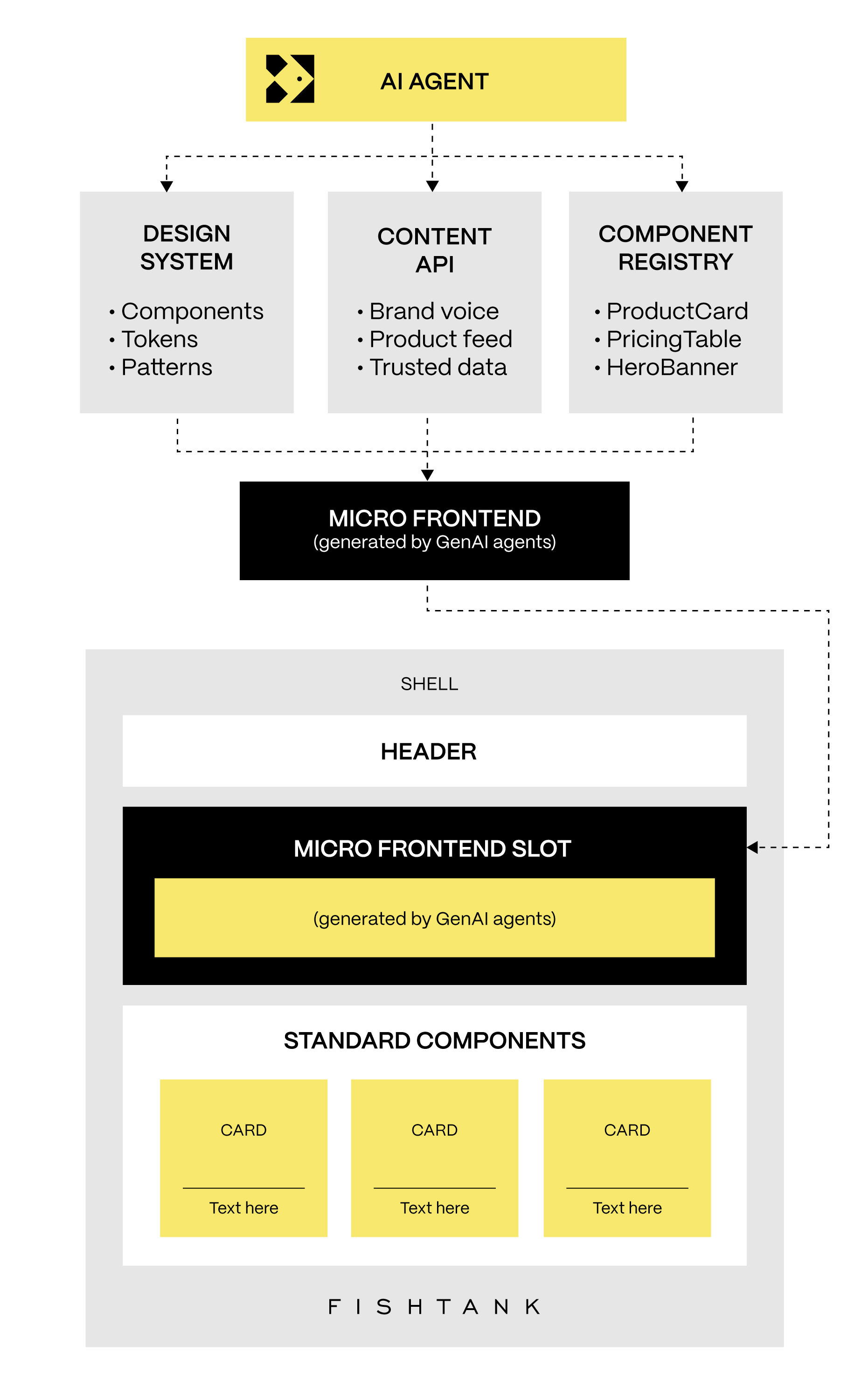
With this toolchain in place, the architecture is ready for a new kind of builder.
For a decade, Micro Frontends solved engineering problems. They made builds faster and deploys safer. But they also built something else: safe channels into the website that didn't exist before.
Generative AI is now powerful enough to write production code. The question was never if AI could build—it was where it could build safely. Micro Frontends answer that question. They give AI—and the marketers directing it—a place to ship without breaking what's already there.
This isn't about adding a chat widget to the corner of your site. This is about AI building the site itself.
Two patterns are emerging that show where the real value lies.
The Canvas Model
This is the more common pattern in traditional websites. AI generates a frontend to solve a specific problem for a specific user. If someone asks for a visualization of Q3 sales trends, the AI doesn't just describe it—it generates the code for a Micro Frontend that renders that chart and mounts it into a designated slot.
Because the slot is isolated, a mistake stays contained. If the AI hallucinates bad code, it crashes only that component—not the entire platform. And because the output is purpose-built, it can actually be better than a generic page designed for 10,000 users. It's built for one user, right now, for one task.
The Dashboard Model
In this pattern, AI acts as the orchestrator. Based on who the user is—their role, history, immediate needs—the AI decides which vertical slices of functionality to display. It assembles the page dynamically.
Those slices might be generated on the fly to target that specific user. Or they might be previously generated components that the AI pulls from a library and composes together. Either way, the page isn't static. It's assembled at runtime, personalized not just in content but in capability.
Both patterns share the same foundation: isolated slots that give AI a safe place to build, and an orchestration layer that lets non-technical teams direct what gets built.
When you adopt this architecture, you aren't just changing how features and functionality are shipped. You are changing who ships it.
This shift is creating two emerging roles that will define the future of frontend development.
1. The New Vibe Coder
This is likely someone in marketing or product. They use AI to generate features, apps, or components. They might have little understanding of the underlying code, but they know exactly what they want to create. They are coding with intent, or vibes. Eventually, vibe coding just becomes creating.
2. The AI Engineer
This is the elite technical expert. They aren't writing HTML to match a Figma mockup anymore—that's yesterday's work. Tomorrow, they are system-level architects. They build the guardrails, the orchestration layers, and the security sandboxes that allow the New Vibe Coders to work safely.
For marketing teams, this architecture unlocks something entirely new: their own vertical slice of the website.
Historically, a marketer had an idea, and a developer had to implement it. Now, marketers backed by AI can generate their own areas of content and functionality. They can own a slice of the page—doing more with less, and moving at the speed of thought rather than the speed of a sprint cycle.
If you let AI generate raw CSS, you end up with a "Frankenstein UI"—inconsistent styles and broken layouts.
To make this work, you need Design System Consistency. This isn't just a PDF style guide; it is a structured, metric-based, deterministic system. The AI shouldn't be generating pixels; it should be generating structured data that maps to your proven components. Every Micro Frontend—whether built by a human or a bot—must use the design system as a hard constraint.
This unlocks a new strategic mindset: Disposable Thinking.
Because the "cost" of creating an app or feature drops to near-zero with AI, we can afford to create "ephemeral software"—applications generated for a specific, transient need (like a weekend flash sale) and then discarded. You stop treating every line of code as a long-term asset to be maintained and start treating it as a disposable tool to get a job done.
Is there a platform ready to support this architecture today? Sitecore is remarkably close—and moving fast. If you're still getting familiar with SitecoreAI as a platform, start here: Intro to SitecoreAI.
Sitecore Components lets you build and embed web components directly into your websites. It brings the Micro Frontend pattern into the platform itself, with the design system infrastructure to support it:
With your design system established, AI Studio lets you build and iterate on web components using AI. Instead of starting from scratch, you work within the brand you've already defined:
Agentic Studio goes further—moving from assisted creation to autonomous generation. You can create custom agents that generate HTML and CSS-based components on demand, opening the door to the dynamic generation patterns we've discussed:
Here is our comprehensive overview of what the SitecoreAI Agentic Studio is (and what it is not).
The platform supports multiple pathways into the same architecture. Organizations can build web components directly, generate variants using AI within an established design system, or deploy agents that produce HTML fragments on demand—all embedding into the same digital platform. The approach scales to how teams want to work, not the other way around.
The future I've described isn't five years away. It is happening right now. But getting there requires more than just buying a license or enabling a feature flag. It requires a shift in how you think about your platform, your team, and your architecture.
At Fishtank, we are building it. We have been deep in the trenches with tech like SitecoreAI, launching platforms that leverage these exact patterns for forward-thinking organizations. We know from experience that technology shifts like this don't just change the website—they change how teams operate and what becomes possible.
We understand the potential of the New Vibe Coder because we work side-by-side with your marketing teams to give them autonomy. We understand the importance of the AI Engineer because that is who we are—building the rigorous design systems, security sandboxes, and orchestration layers that make this innovation safe at an enterprise scale.
Please contact us at Fishtank for an open and honest discussion about your architecture. We'd love to help you make the right decision for your organization.
We appreciate you contacting us, and a member of our team will be in touch shortly to address your inquiry.