Reading time: 4 min read
Publishing Center for SitecoreAI
Discover Publishing Center, a SitecoreAI marketplace extension that simplifies publishing
Start typing to search...
Managing publishing in Sitecore can often feel more complex than it should be, especially for authors working inside Page Builder who simply want confidence that their content is live and up to date.
That is why Publishing Center was created.
Publishing Center is a marketplace extension for SitecoreAI environments that helps authors and developers better understand, monitor, and manage page publishing from a single, page-centric interface.
It is lightweight, simple to configure, and designed to work across any Sitecore AI environment.
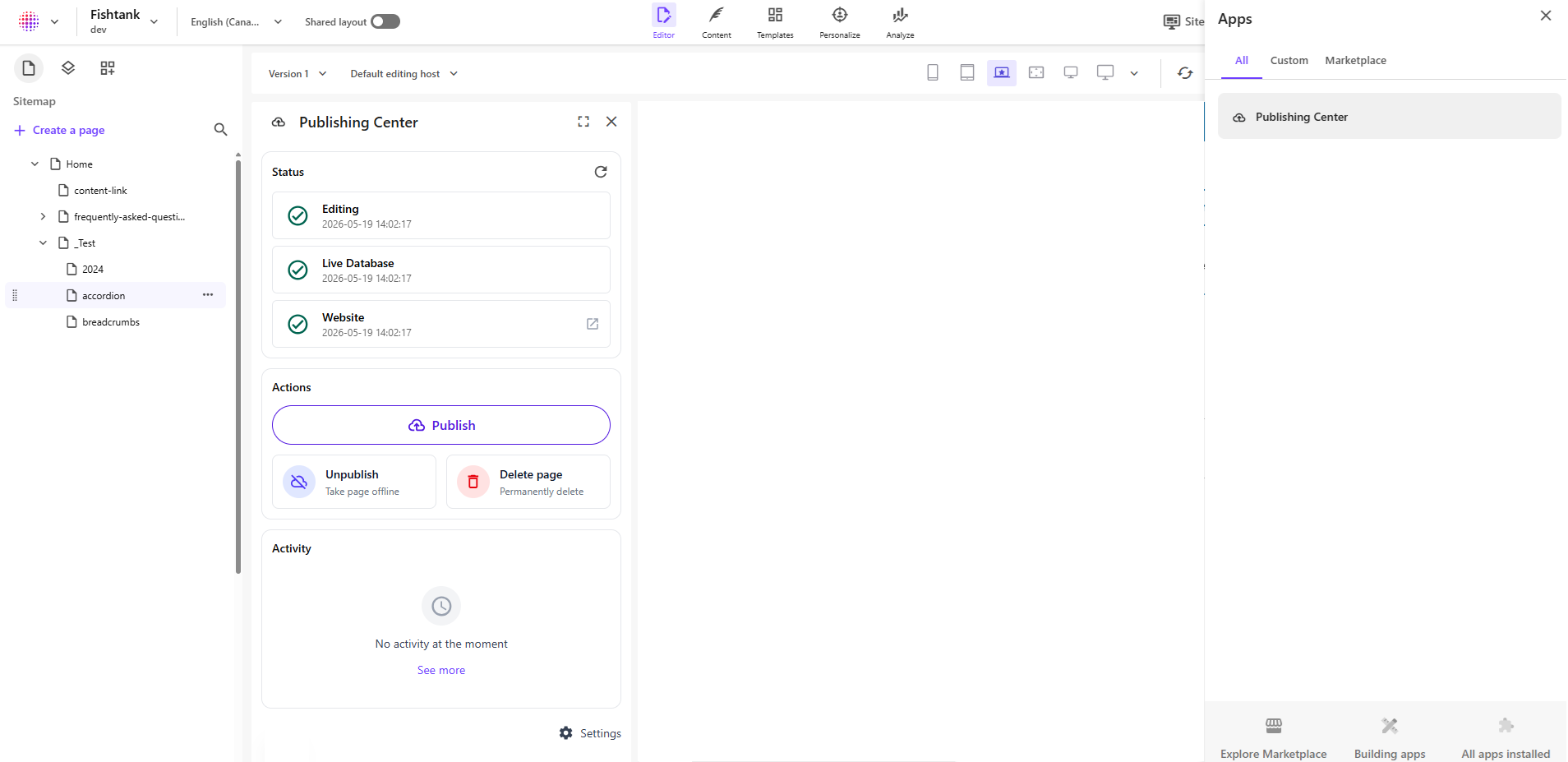
Traditional publishing workflows often leave authors with questions like:
Publishing Center was designed to reduce this uncertainty and simplify publishing operations for both content authors and developers.
The focus is:
Give authors visibility, confidence, and control over publishing — directly from the page they are editing.
Publishing Center is divided into three main functional areas:
The publishing Status section gives authors a clear understanding of whether a page is synchronized across different publishing layers.
The status is presented through three independent views:
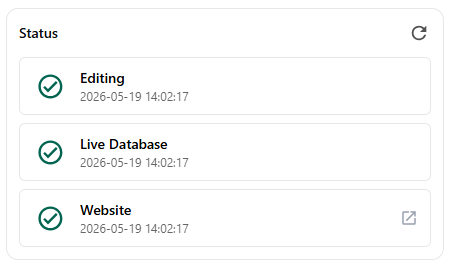
This makes it possible to quickly identify where content may be outdated or missing.
For example:
To determine timestamps and freshness, Publishing Center uses the Sitecore __Updated field as the canonical reference.
The Website check is performed by a page fetch, getting the "Last-Modified" meta element in the page. The meta element name can be configured.
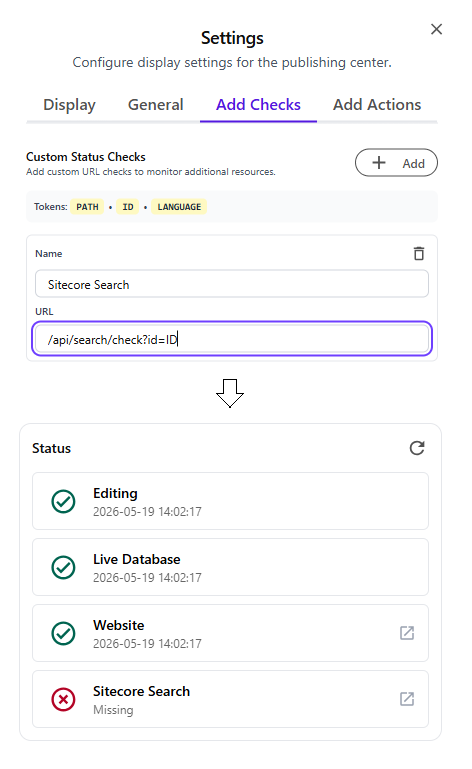
Publishing Center also supports custom publishing verification endpoints.
This allows teams to validate publishing across external systems or delivery layers beyond Sitecore itself.
A custom status check works through a configurable URL request:
For example:
{ "2026-12-15T18:22:00Z" }This capability is especially useful for validating:
The Actions area centralizes common publishing operations into simple, author-friendly controls.
The goal is to reduce operational complexity and remove unnecessary publishing decisions from authors.

Publishing should be simple.
The Publish action provides a single-button publishing experience that automatically includes references.
Authors should not need to decide:
Publishing Center handles that automatically to maximize publishing reliability.
One button should be enough to guarantee a successful publish.
The Unpublish action removes a page from the live experience in a safe and predictable way.
When executed, Publishing Center:
This gives authors a clear and direct way to take content offline without requiring manual publishing operations afterward.
Deleting content is often more complicated than expected.
To simplify this workflow the Delete action only allows deletion of pages that are already unpublished, ensuring that removed content is no longer accessible from the live site.
This avoids situations where content is deleted in authoring but still exists on the live website because a parent item was never republished.
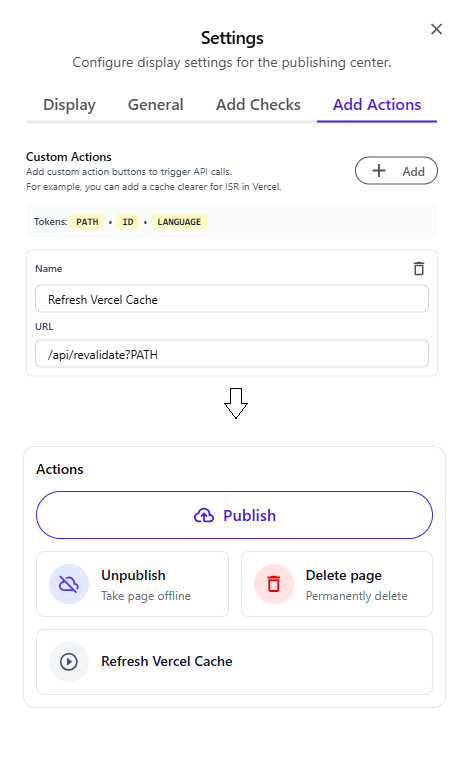
Publishing Center supports configurable Custom Actions.
A custom action is defined through:
When executed, Publishing Center triggers the configured endpoint.
This creates a flexible integration layer that allows authors to manually execute operational tasks when needed.
Examples include:
Ideally, many of these operations should happen automatically as part of the publishing pipeline.
However, custom actions provide an important operational fallback by allowing authors or support teams to manually retry or trigger specific processes when necessary.
Publishing operations are not always instantaneous.
In environments with multiple users or heavy publishing activity, delays can create uncertainty and frustration.
The publishing Activity panel helps solve this problem by providing visibility into ongoing publishing operations.

This helps authors understand:
By improving visibility into publishing activity, authors gain better expectations about when content should become available.
Publishing Center includes a centralized Settings area where teams can configure behavior and integrations.
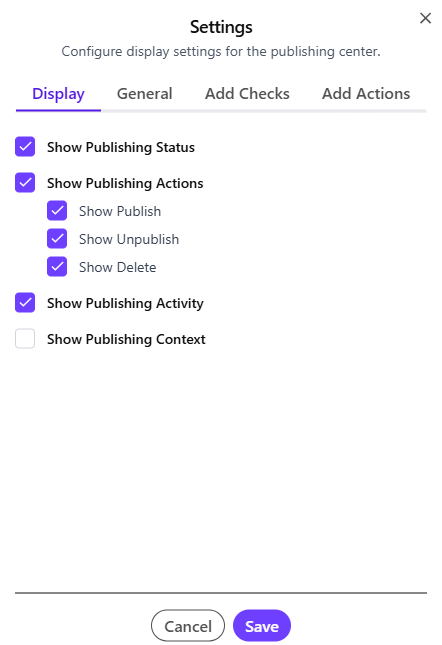
Configuration options include:
Last-Modified)This allows it to adapt to different Sitecore architectures and publishing strategies.
Publishing Center was built with two audiences in mind:
Who want:
Who want:
Find Publishing Center in the SitecoreAI Marketplace or use the published instance to manually configure it.
URL: https://publishing-center.vercel.app/
Icon: https://publishing-center.vercel.app/icon.png
Configure as a "Page context panel" extension point.