Reading time: 10 min read
Why your SitecoreAI component A/B test may not work in Page Builder or live
A field guide to the issues and the solutions related to Component A/B Testing in SitecoreAI
Start typing to search...
A field guide to the issues and the solutions related to Component A/B Testing in SitecoreAI
Component A/B testing in SitecoreAI looks like a five-minute job, and once it’s up and configured properly, it really is. Pick a component in Page Builder, enable component A/B testing, create Variant B, set a 50/50 split, start the test and publish. When it works, it really is that easy. When it doesn’t however, you can spend a good hour and it can be frustrating to a client when they think it’s ready but it’s really not.
A component A/B test only works when two separate systems build the same identifier string. If they disagree by even one character, or as it turns out, a letter casing, the test silently never runs and because of how component A/B testing works, you may not know it if you’re in that 50% that sees component A every time.
When you create a test in Page Builder, SitecoreAI writes a flow definition (an experiment) to the embedded Personalize tenant. That flow definition gets a friendly ID shaped like this:
component_<scope><pageId><componentId><language><timestamp>At request time, the Content SDK personalize proxy on your rendering host builds its own version of that ID and asks Personalize to execute it. If Personalize finds a match, it returns the variant to render. If not, the proxy logs skipped (no variant(s) identified) and renders the default. For a recent client, we found out the hard way thinking it was right but turned out that the <scope> was not set properly. Ultimately when it fails it is most often the result of only a few setups.
On the SitecoreAI side, you need to have PAGES_PERSONALIZE_SCOPE set for the backend side and NEXT_PUBLIC_PERSONALIZE_SCOPE set for the front-end. And then in Vercel (or your appropriate host), you need NEXT_PUBLIC_PERSONALIZE_SCOPE set. All three of those need to have the same value. Or, none of them need to be set. It really depends if you have multiple sites or you want to segregate your personalization and analytics.
Symptom: The test is live, the split is 50/50, the page is published, and every visitor still gets the default variant.
In our case, the external front-end host had NEXT_PUBLIC_PERSONALIZE_SCOPE set. It had been there since launch, so it felt like settled configuration. The SitecoreAI environment had no PAGES_PERSONALIZE_SCOPE at all. With debug logging on, the mismatch was obvious:
content-sdk:personalize fetching personalize info for mysite /some-page en
content-sdk:personalize executing experience for component_mysite_<pageId>_<componentId>_en*
content-sdk:personalize skipped (no variant(s) identified)
That said, it was even more obvious without even debugging because we couldn’t see any analytics while in Page Builder. Which surprised us, let me tell you. But that’s a clear indication that no analytics are being assigned correctly. They’re still being collected, but because of the mismatch you won’t see them here.
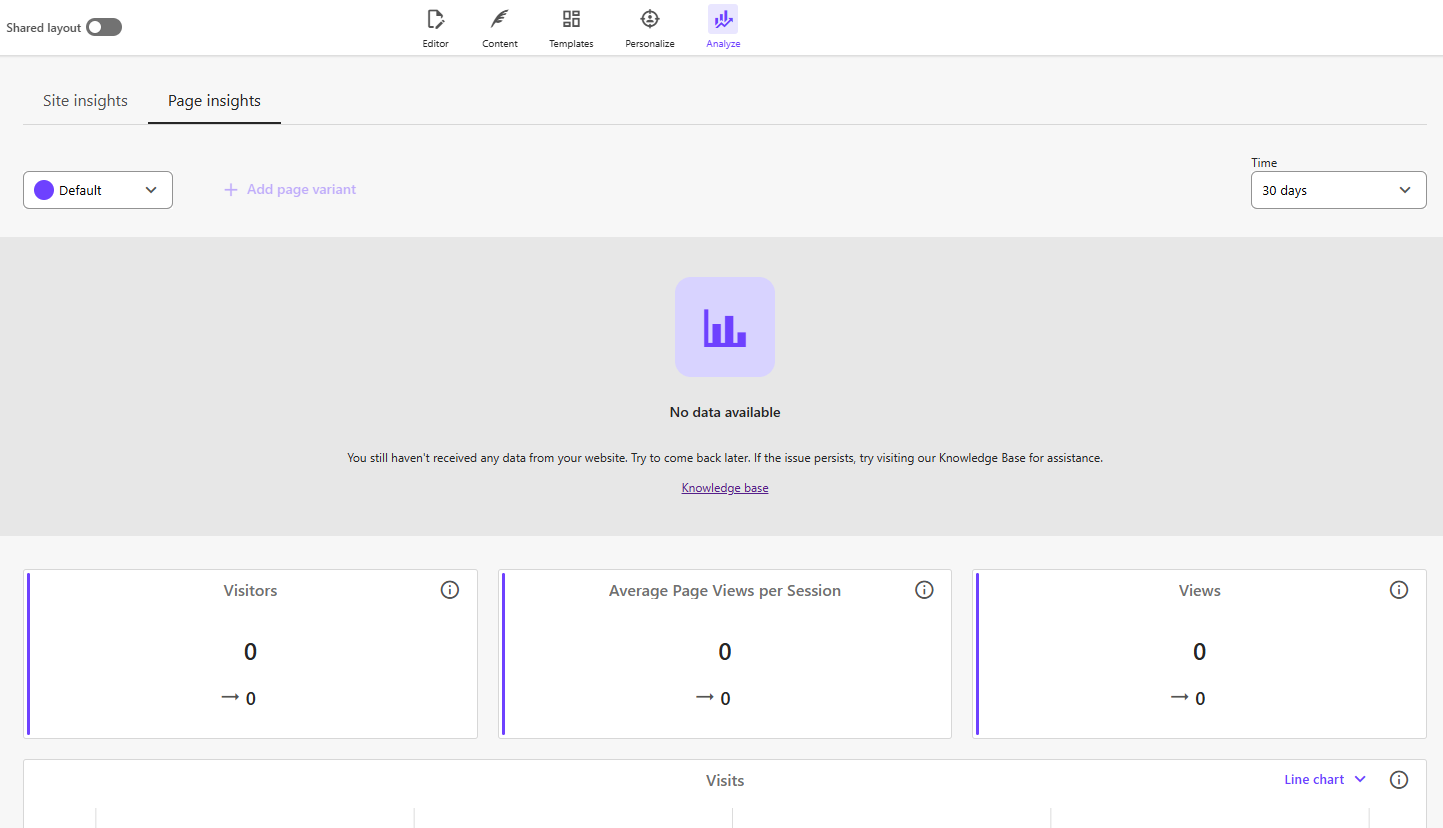
That was our first clue that something configuration-wise was not setup properly.
The front end was asking for component_mysite_<pageId>_<componentId>. Page Builder had created component_<pageId>_<componentId>. Same test, two different names.
There are two ways out, and the right one depends on your history:
For option 2, "everywhere" means:
PAGES_PERSONALIZE_SCOPE in the SitecoreAI environmentNEXT_PUBLIC_PERSONALIZE_SCOPE in the SitecoreAI environment, for the editing hostNEXT_PUBLIC_PERSONALIZE_SCOPE in every external rendering host connected to that environmentWe tested dropping NEXT_PUBLIC_PERSONALIZE_SCOPE from the SitecoreAI environment and keeping only PAGES_PERSONALIZE_SCOPE. Page Builder then couldn't create component tests at all. You need both.
Just a bit of a warning before you change it. Changing PAGES_PERSONALIZE_SCOPE can reset existing personalizations, because previously generated identifiers stop matching. Treat a scope change in production as a migration. Inventory your live tests and personalizations first, and expect to recreate some. Also changing the scope value can prevent you from modifying or changing an existing component a/b test requiring you to reset it back to the old one, make those changes, stop everything etc and then proceed with your change.
Symptom: Scopes match everywhere, page insights start working, but you won’t see the configuration because the NEXT_PUBLIC_ value doesn’t match. This may end up being addressed in a future update.
Our scope matched the site name, which was uppercase. Sitecore Support traced it to an inconsistency: when SitecoreAI generates flow definition IDs, it lowercases the scope. When it later maps those flow definitions back to components, it doesn't. An uppercase scope creates experiments Page Builder can't find again.
You can see it in the Personalize flowDefinitions API. Every friendly ID had a lowercase scope, while the configured value was uppercase.
So for now, the fix: use a lowercase scope, in every variable, in every environment. It's a one-word rule that would have saved us days. Honestly, days.
While you're at it, keep it short and alphanumeric. Don't reuse a site name just because it's handy. If you want separate scopes per environment (e.g. mysiteqa and mysite), decide that up front. Changing it later can result in the same issue we talked about before.
This one stumped us for a bit because after all of the above, we thought we had it signed, sealed and delivered. But what was happening was the following:
Note: This issue was happening for a client running CSDK 2.3 using Pages Router on Vercel. So it’s entirely possible it won’t affect you in another version.
So why was it happening? Well, on the Pages Router, client-side navigation loads page data from /_next/data/<build>/<page>.json. Next.js keeps those responses in a browser cache for the whole session. The only header a server can send to opt a response out of that cache is x-middleware-cache: no-cache, and Next.js 16.2 still checks only that name.
Content SDK 1.x's PersonalizeMiddleware sent x-middleware-cache: no-cache. When middleware was renamed to proxy in 2.x, PersonalizeProxy switched to x-proxy-cache: no-cache, which Next.js doesn't recognise. So the first variant the browser fetched for a page is reused on every later link or back/forward navigation. A refresh skips that cache and goes through the proxy again, which is why it shows the right variant. Unfortunately prefetch={false} didn’t fix it. In the Pages Router, next/link still prefetches on hover and touch, and that response gets cached in the same way.
The fix as it turned out was in src/proxy.ts. By copying the SDK's header to the name Next.js reads. Leave your existing defineProxy(...) chain unchanged. Here’s what we ended up doing.
 const personalize = new PersonalizeProxy({
    /**
     * List of sites for site resolver to work with
     */
    sites,
    ...scConfig.api.edge,
    ...scConfig.personalize,
    skip: () => false,
  });

  return defineProxy(multisite, redirects, personalize)
    .exec(req)
    .then((res) => {
      // Content SDK 2.x marks personalized responses with x-proxy-cache, but the
      // Next.js Pages Router data cache only honours x-middleware-cache.
      if (res.headers.get('x-proxy-cache') === 'no-cache') {
        res.headers.set('x-middleware-cache', 'no-cache');
      }
      return handleCors(req, res);
    });
}
Page Builder without personalization keep their normal caching, because the SDK only sets the header when a page has personalization. Hover prefetches still send a request, but Next.js now throws the response away, so clicking the link fetches the page again through the proxy.
So how can you check it’s now working? Test in a production build (npm run build && npm start). Next.js doesn't prefetch in development.
_next/data.There are three tools that found every one of these problems. Use them before you open a ticket, and attach the output when you do.
On the rendering host and the SitecoreAI editing host enable the DEBUG environment variable with the following so you can see what’s going on behind the scenes. Do this in SitecoreAI and your front-end host:
DEBUG=sitecore-cloudsdk:*,content-sdk:personalizeThe lines that matter:
fetching personalize info for <scope> <path> <lang> - Shows the scope the front end is using. Compare it with Pages.executing experience for component_ - The exact friendly ID being requestedskipped (no variant(s) identified) - No flow definition matched that ID. Usually a scope mismatch.skipped (preview) - Expected in edit and preview modeCompare each friendlyId with what the logs request. A missing scope, an extra scope, or different casing jumps out immediately. You can also check that each variant's variantId is distinct.
From the browser while reproducing, both on the live page and in Pages, open up your Dev Tools and download the HAR file. On the live page it shows what personalize calls fire. In Page Builder it shows which requests return 500s when the test panel fails to load. If you’re needing to contact support, this always comes in handy.
If you're setting up component A/B testing for the first time, or one has stopped working, go through this list in order.
PAGES_PERSONALIZE_SCOPE in the SitecoreAI environment.NEXT_PUBLIC_PERSONALIZE_SCOPE to the same value in the SitecoreAI environment.NEXT_PUBLIC_PERSONALIZE_SCOPE to the same value on every external rendering host for that environment.SITECORE_EDITING_SECRET is set, and the editing host logs show no IE-007 site-resolution errors.While we had worked with Sitecore on this, and things were looking up, we encountered yet another issue, that turned out to be a legitimate bug in Page Builder. It was causing not only the configuration from showing but even saving properly.
The test panel in Page Builder was empty or broken, and the editing host logs are full of site-resolution errors. Component test configuration runs through the SitecoreAI editing host, not your public site. If that host is unhealthy, the A/B panel is the first thing to fail. These were the errors we saw:
Multisite proxy failed:
Error: [IE-007] Could not resolve site for host "xmc-<id>.sitecorecloud.io".

Error: In the 'layout' field, the 'site' argument cannot be empty.

content-sdk:editing invalid editing secret - sent "undefined" expected "xxxx"
When we eventually got the configuration loading, while working with Sitecore, we found that when we configured the variants, they wouldn’t actually save.
This one wasn't configuration. Sitecore Support reproduced it, logged it as a product bug, and shipped a fix in a later release, pretty fast actually once it was identified. Until then, one variant kept returning the same rendering variant no matter what we picked, while edits landed on the other.
While we initially were happy with things, further testing was needed before we could go back to the client. So if you’re running into issues anywhere in the above setup, I highly recommend doing the following before signing off.
After all that craziness, component A/B testing should be working swimmingly for you. Got a bit bumpy for sure, but when it runs. Clients love it.