Reading time: 17 min read
How to implement multilingual UI labels using Sitecore Dictionary in SitecoreAI
A practical guide to centralizing, fetching, and rendering translated UI strings in Next.js with Sitecore Content SDK.
Start typing to search...
Every multilingual website has two translation problems.
The first is content translation. It's the one everyone thinks about: page titles, body copy, hero images. Sitecore handles this natively through language versions on content items.
The second is quieter but just as pervasive: UI string translation. Every "Read More" button, every "Home" breadcrumb label, every "Search site content..." placeholder, every "No results found" empty state. These strings live in code, not in content items, and they don't translate themselves.
Hardcoding works fine until the day your site goes bilingual. Then every "Read More" scattered across your codebase becomes a bug, visible to users, invisible to content authors, and tedious to fix one component at a time.
The Sitecore Dictionary solves this cleanly: a centralized, CMS-managed key-value store for UI strings with full language versioning. Content authors manage translations in an interface they already know. Developers reference keys in code without worrying about specific languages. Neither side blocks the other.
This guide walks through a complete implementation (from portal configuration through production component patterns) using a real SitecoreAI starter kit with @sitecore-content-sdk/nextjs and next-localization.
Before touching any code, it helps to see the full pipeline. A translated string passes through five layers on its way from CMS to screen:
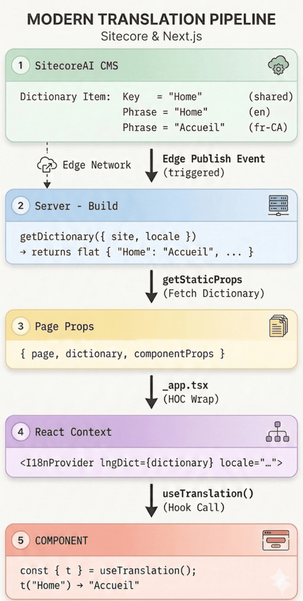
Each layer has a single responsibility:
| Layer | Owns | Changes require | Who |
|---|---|---|---|
| CMS | Translation content | CMS publish (no deploy) | Content Author |
| Server | Locale-aware fetching | Code change | Developer |
| Page Props | Data transport | Automatic (pass-through) |
|
| React Context | Distribution to tree | Automatic (provided by SDK) |
|
| Component | Rendering the string | Code change | Developer |
This separation means content authors can update translations without code deployments, and developers can add new keys without CMS access.
Everything starts in the CMS. Before writing a single line of Next.js code, you need to register your target languages in Sitecore. This is a multi-layer process, and skipping any layer produces confusing downstream failures: a language that "exists" but doesn't appear, or translations that work in preview but not on the live site.
Every SitecoreAI environment starts with English (en). To support French, German, or any other locale, you must explicitly add it.
Adding a predefined language (e.g., French - Canada, German):
/sitecore/System/Languages in the content treefr-CA for French-Canada, de-DE for German)The new language item now appears under /sitecore/System/Languages/:
/sitecore/System/Languages/
├── en          (English - default)
├── fr-CA (French - Canada)Alternatively, you can manage languages from the SitecoreAI portal's Settings > Languages screen:
English for fr-CA)The Languages screen shows all registered languages with their fallback configuration and language codes:
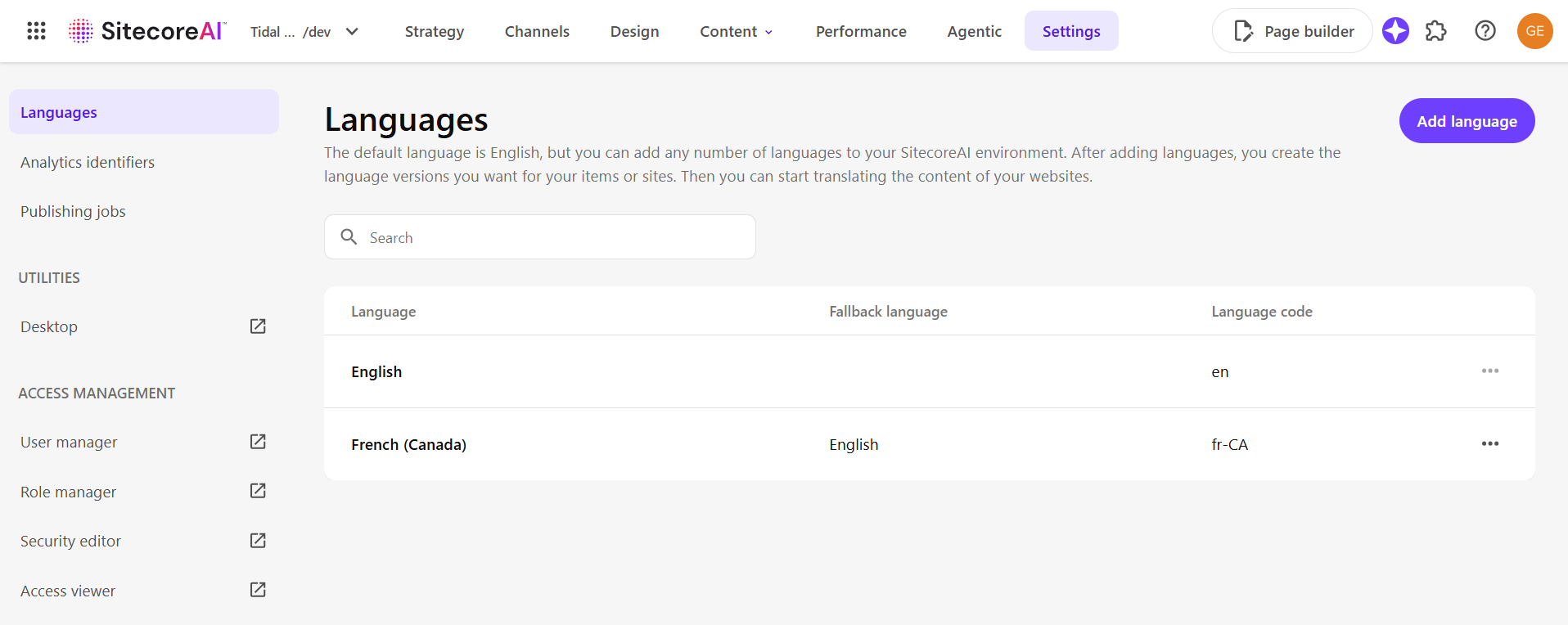
Adding a language to the environment makes it available. To make it active for a specific site, you need to register it in the site's settings.
Language fallback determines what happens when content doesn't have a version in the requested language. Instead of showing a blank page, Sitecore can fall back to another language.
Setting fallback on the language item:
/sitecore/System/Languages/fr-CA (or your target language)en (or whichever language should serve as the fallback)Here's what this looks like in a serialized language item:
/sitecore/system/Languages/fr-CA.yml
SharedFields:
  - Hint: Regional Iso Code
    Value: "fr-CA"
  - Hint: Charset
    Value: "iso-8859-1"
  - Hint: Encoding
    Value: "utf-8"
  - Hint: Fallback Language
    Value: en # Falls back to English
  - Hint: Iso
Value: frWith the language enabled, you need to create language versions so authors have something to translate.
Bulk-create versions using the SXA script:
/sitecore/content/{YourSiteCollectionName}/main)en (source)fr-CA (target)This copies all field values from English to the target language across the entire site tree, giving content authors a starting point for translation. Dictionary items under the site tree are included in this operation, but you'll still want to review and translate them individually — covered in detail in Step 2.
To version-control languages and dictionary entries, include them in your SCS module configuration. Add /sitecore/system/Languages (scope: DescendantsOnly) to a languages module, and serialize dictionary items under /sitecore/content/{YourSiteCollectionName}/{YourSiteName}/Dictionary.
In SitecoreAI, serialized items are packaged into an IAR (.dat) file by the deployment process and automatically deployed to the CM filesystem — developers don't need to run any push commands for cloud environments. However, if you're using Docker for local development, you'll need to run dotnet sitecore ser push during initial setup and whenever you switch branches.
Before moving to the Next.js side, verify each layer is in place. A missing layer here produces confusing bugs later: languages that "exist" but show no content, or translations that work in one environment but not another.
| Layer | What to verify | Example |
|---|---|---|
| Environment | Language items at /sitecore/System/Languages/ |
en, fr-CA |
| Site | Languages enabled in SitecoreAI Portal > Sites | en + fr-CA |
| Fallback | Fallback Language field on language items |
fr-CA → en |
| Serialization | .module.json includes for languages and dictionary |
common.languages.module.json |
With languages configured, it's time to populate the dictionary itself. This is where the CMS work directly connects to what developers will consume in code. Every key you create here becomes a t() call in a React component.
Dictionary items live under your site's content tree at:
/sitecore/content/{YourSiteCollectionName}/{SiteName}/Dictionary/For maintainability on large sites, organize entries in alphabetical subfolders:
/Dictionary/
├── A/
│   ├── Achievements.yml
│   └── Applications.yml
├── B/
│   └── BackTo.yml
├── H/
│   └── Home.yml
├── R/
│   └── ReadMore.yml
└── S/
    ├── Search.yml
    └── SubmitSearch.yml
Each dictionary entry item has two critical fields:
| Field | Scope | Purpose |
|---|---|---|
| Key | Shared (language-independent) | The lookup identifier used in code via t('...') |
| Phrase | Versioned (per language) | The translated output displayed to users |
Here's what a serialized dictionary item looks like:
/Dictionary/A/Achievements.yml
SharedFields:
  - ID: "580c75a8-c01a-4580-83cb-987776ceb3af"
    Hint: Key
    Value: Achievements
Languages:
  - Language: en
    Fields:
      - ID: "2ba3454a-9a9c-4cdf-a9f8-107fd484eb6e"
        Hint: Phrase
        Value: Achievements
  - Language: fr-CA
    Fields:
      - ID: "2ba3454a-9a9c-4cdf-a9f8-107fd484eb6e"
        Hint: Phrase
        Value: Réalisations
Warning: The
Keyfield value must exactly match the string you pass tot()in your code. Not the item name, not the display name — theKeyfield. A mismatch liket('Filtering by tags:')in code versus a Key ofFiltering by tag(s):in Sitecore is a silent failure that returns the key string as-is. These mismatches are invisible to end users on English pages (since the fallback is the English key) and only surface when someone switches to another language.
Each dictionary entry needs a Phrase value for every supported language:
/sitecore/content/{YourSiteCollectionName}/{YourSiteName}/Dictionary/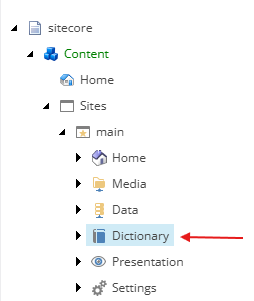
The CMS side is done. Now the front end needs to know which locales exist. Rather than scattering locale strings across config files, create a centralized configuration that both Next.js routing and the Sitecore SDK can reference:
Note: The examples in this guide use the Pages Router (
next.config.jswithi18n,_app.tsx,getStaticProps). If your project uses App Router, it's handled differently and will not be covered in this guide.
// src/lib/i18n/i18n-config.js
const defaultLocale = "en";
const applicationLocales = [defaultLocale, "fr-CA"];
module.exports = {
  defaultLocale,
  applicationLocales,
};
With this standard setup, Next.js serves the default locale (en) at unprefixed URLs and other locales at prefixed paths:
| URL | Locale |
|---|---|
/about |
en (default, no prefix) |
/fr-CA/about |
fr-CA |
Wire this into next.config.js:
// next.config.js
const {
  applicationLocales,
  defaultLocale,
} = require("./src/lib/i18n/i18n-config");
module.exports = {
  i18n: {
    locales: applicationLocales,
    defaultLocale:
      process.env.DEFAULT_LANGUAGE ||
      process.env.NEXT_PUBLIC_DEFAULT_LANGUAGE ||
      defaultLocale,
    localeDetection: false,
  },
  // ... rest of config
};
Wire this into next.config.js:
// next.config.js
const {
  applicationLocales,
  defaultLocale,
} = require("./src/lib/i18n/i18n-config");
module.exports = {
  i18n: {
    locales: applicationLocales,
    defaultLocale: defaultLocale,
    localeDetection: false,
  },

  // ... rest of config
};
And into Sitecore's redirect configuration:
// sitecore.config.ts
import { defineConfig } from "@sitecore-content-sdk/nextjs/config";
import { applicationLocales } from "lib/i18n/i18n-config";
export default defineConfig({
  // ... api config ...
  redirects: {
    enabled: true,
    locales: applicationLocales,
  },
});
Why
localeDetection: false? In a SitecoreAI setup, Sitecore controls locale routing, not the browser'sAccept-Languageheader. Disabling Next.js auto-detection prevents conflicts with Sitecore's language resolution.
Advanced: Forcing a locale prefix on every URL. Some projects require every URL to include a locale segment (e.g.,
/en/aboutinstead of/about). This can be achieved by settingdefaultLocaleto a sentinel value likedefaultand using custom middleware to redirect unprefixed URLs to their locale-prefixed equivalents. This approach adds complexity and is not covered in this guide.
With routing configured, the dictionary needs to reach each page and become available to every component. This happens in two parts: fetching the dictionary at build time, then injecting it into React context.
Good news: This dictionary fetching is already included in all Content SDK Next.js Pages Router sample apps and starter kits (content-sdk starter, xmcloud-starter-js). If you scaffolded your project from one of these, the wiring is already in place.
The dictionary is fetched at build time alongside layout data using getStaticProps. This is the standard Static Site Generation (SSG) pattern — pages are pre-rendered at build time, with optional ISR revalidate to refresh them periodically after deployment.
// src/pages/[[...path]].tsx
import { GetStaticPaths, GetStaticProps } from "next";
import {
  SitecorePageProps,
  StaticPath,
  SiteInfo,
} from "@sitecore-content-sdk/nextjs";
import { extractPath } from "@sitecore-content-sdk/nextjs/utils";
import { isDesignLibraryPreviewData } from "@sitecore-content-sdk/nextjs/editing";
import client from "lib/sitecore-client";
import components from ".sitecore/component-map";
import scConfig from "sitecore.config";
import sites from ".sitecore/sites.json";
export const getStaticPaths: GetStaticPaths = async (context) => {
  let paths: StaticPath[] = [];
  let fallback: boolean | "blocking" = "blocking";
  if (
    process.env.NODE_ENV !== "development" &&
    scConfig.generateStaticPaths
  ) {
    try {
      paths = await client.getPagePaths(
        sites.map((site: SiteInfo) => site.name),
        context?.locales || []
      );
    } catch (error) {
      console.log("Error occurred while fetching static paths");
      console.log(error);
    }
    fallback = process.env.EXPORT_MODE ? false : fallback;
  }
  return { paths, fallback };
};
export const getStaticProps: GetStaticProps = async (context) => {
  let props = {};
  const path = extractPath(context);
  let page;
  if (context.preview && isDesignLibraryPreviewData(context.previewData)) {
    page = await client.getDesignLibraryData(context.previewData);
  } else {
    page = context.preview
      ? await client.getPreview(context.previewData)
      : await client.getPage(path, { locale: context.locale });
  }
  if (page) {
    props = {
      page,
      dictionary: await client.getDictionary({
        site: page.siteName,
        locale: page.locale,
      }),
      componentProps: await client.getComponentData(
        page.layout,
        context,
        components
      ),
    };
  }
  return {
    props,
    revalidate: 5, // ISR: regenerate at most every 5 seconds
    notFound: !page,
  };
};
The key method here is getDictionary({ site, locale }) — Sitecore Content SDK calls the Edge endpoint with a GraphQL query that fetches all dictionary entries for the given site and locale. The response is flattened into a Record<string, string> where keys are the Key field values and values are the Phrase field values. You don't write this query yourself — the SDK handles it — but knowing this helps when debugging missing translations in the Edge delivery network.
For an English request, getDictionary() returns:
{
  "Home": "Home",
  "Search": "Search",
  "Read More": "Read More",
  "Back to": "Back to"
}
For a French-Canada request:
{
  "Home": "Accueil",
  "Search": "Rechercher",
  "Read More": "En savoir plus",
  "Back to": "Retour à"
}The dictionary is now in page props. To make it accessible everywhere without prop-drilling, wrap the application with a translation provider in _app.tsx:
// src/pages/_app.tsx
import type { AppProps } from "next/app";
import { I18nProvider } from "next-localization";
import { SitecorePageProps } from "@sitecore-content-sdk/nextjs";
import scConfig from "sitecore.config";
function App({
  Component,
  pageProps,
}: AppProps<SitecorePageProps>): JSX.Element {
  const { dictionary, ...rest } = pageProps;
  return (
    <I18nProvider
      lngDict={dictionary}
      locale={pageProps.page?.locale || scConfig.defaultLanguage}
    >
      <Component {...rest} />
    </I18nProvider>
  );
}
export default App;
The next-localization package stores the flat dictionary in React context and exposes a useI18n() hook for lookups. Like the dictionary fetching in Step 4A, this provider is already wired up in all Content SDK Next.js Pages Router sample apps and starter kits.
Calling useI18n() directly in every component means duplicating error handling and coupling your entire codebase to a specific library. A thin custom hook solves both:
// src/lib/hooks/useTranslation.tsx
import { useI18n } from "next-localization";
export const useTranslation = () => {
  const i18nResult = useI18n();
  const translate = (key: string): string => {
    if (!i18nResult || typeof i18nResult.t !== "function") {
      console.warn(
        `Translation warning: i18n context not available. Returning key "${key}" as fallback.`
      );
      return key;
    }
    const result = i18nResult.t(key);
    if (result === "" || typeof result !== "string") {
      console.warn(
        `Translation warning: No translation found for key "${key}" in the dictionary.`
      );
      return key;
    }
    return result;
  };
  return { t: translate };
};
Why this wrapper matters:
| Benefit | Without wrapper | With wrapper |
|---|---|---|
| Missing key | Empty string or undefined |
Returns the English key as fallback |
| Missing provider | Runtime crash | Console warning + fallback |
| Library swap | Update every component | Change one file |
| Debugging | Silent failure | Console warnings pinpoint the key |
The infrastructure is in place. Here's where it pays off: five patterns for consuming dictionary keys in real components, covering the vast majority of production translation scenarios.
The most straightforward use — rendering a translated label:
const { t } = useTranslation();
return <span>{t("Home")}</span>
// en: "Home" | fr-CA: "Accueil"Translations aren't just visual — screen readers need them too, and form placeholders must match the user's language. Untranslated aria-label or placeholder values mean a broken experience for non-English users:
<Link aria-label={t("Home")} href="/">
  <HomeIcon />
</Link>
<button aria-label={t("Close search modal")} onClick={closeModal}>
  {t("Close")} <IconFas icon="xmark" variant="white" />
</button>
<input
  type="search"
  aria-label={t("Search site content")}
  placeholder={t("Search site content")}
/>Combine translated fragments with dynamic CMS values:
<a aria-label={`${t('Back to')} ${previousPageName}`}>
  <span>{previousPageName}</span>
</a>
Here, "Back to" is translated via the dictionary, while previousPageName comes from the Sitecore content tree (already language-versioned via displayName).
Not all dictionary keys appear as literal t('...') calls. When a key is determined at runtime (for example, by mapping a page's Sitecore template ID to a content type label) searching the codebase for t('Article') returns zero results, even though t() receives 'Article' at runtime:
// src/lib/graphql/id.ts — Sitecore template GUIDs
export const ARTICLE_TEMPLATE_ID = '{XXXXXXXX-XXXX-XXXX-XXXX-XXXXXXXXXXXX}';
export const NEWS_TEMPLATE_ID = '{YYYYYYYY-YYYY-YYYY-YYYY-YYYYYYYYYYYY}';
export const INSIGHTS_TEMPLATE_ID = '{ZZZZZZZZ-ZZZZ-ZZZZ-ZZZZ-ZZZZZZZZZZZZ}';
// src/component-children/Foundation/BasePage/Metadata.tsx
const CONTENT_TYPE_MAP: { [key: string]: string } = {
  [ARTICLE_TEMPLATE_ID]: 'Article',    // t('Article')
  [NEWS_TEMPLATE_ID]: 'News',          // t('News')
  [INSIGHTS_TEMPLATE_ID]: 'Insight',   // t('Insight')
};
const contentTypeDictionaryKey = CONTENT_TYPE_MAP[templateId] || 'Generic Page';    // t('Generic Page')
const contentType = t(contentTypeDictionaryKey);As your dictionary grows past a few dozen entries, raw string keys become a liability — typos are silent failures. A constants file provides autocomplete, catches errors at build time, and serves as living documentation of every key the front end depends on:
// src/lib/consts/dictionary-keys.ts
export const dictionaryKeys = {
  HOME: 'Home',
  SEARCH: 'Search',
  SEARCH_SITE_CONTENT: 'Search site content',
  SUBMIT_SEARCH: 'Submit search',
  READ_MORE: 'Read More',
  BACK_TO: 'Back to',
  NO_RESULTS: 'No results',
  CLOSE: 'Close',
  CLOSE_SEARCH_MODAL: 'Close search modal',
  OPEN: 'Open',
  TOP: 'Top',
  PAGINATION: 'Pagination',
  // Content types (indirect keys — used via CONTENT_TYPE_MAP)
  ARTICLE: 'Article',               // t('Article')
  NEWS: 'News',                     // t('News')
  INSIGHT: 'Insight',               // t('Insight')
  GENERIC_PAGE: 'Generic Page',     // t('Generic Page')
} as const;
export type DictionaryKey = (typeof dictionaryKeys)[keyof typeof dictionaryKeys];
Then in components:
import { dictionaryKeys } from "lib/consts/dictionary-keys";
const { t } = useTranslation();
<span>{t(dictionaryKeys.HOME)}</span>
<input placeholder={t(dictionaryKeys.SEARCH_SITE_CONTENT)} />
<button>{t(dictionaryKeys.READ_MORE)}</button>
Benefits:
These are the issues that come up repeatedly in production SitecoreAI projects. Each one is a silent failure. The app doesn't crash, it just shows the wrong language.
Symptom: French users see English text for some strings.
Cause: The t() key in code doesn't exactly match the Key field in Sitecore.
Code:     t('Filtering by tags:')
Sitecore: Key = "Filtering by tag(s):"
Fix: Establish a convention that the Key field is the exact English phrase used in code. Periodically audit by comparing t() calls in the codebase against serialized dictionary YAML files.
Symptom: A specific locale falls back to the key string while others work.
Cause: The dictionary item exists but has no Phrase for that language.
Fix: When creating dictionary items, always create Phrase values for all supported languages before publishing. Use the SXA "Add Site Language" script or Content Import/Export for bulk operations.
Symptom: 404 and 500 pages show untranslated UI.
Cause: getDictionary() wasn't called in the error page's data fetching.
Fix: Apply the same getStaticProps pattern from Step 4 to your 404.tsx and 500.tsx pages. Ensure getDictionary() is called with the correct site and locale so the translation provider has data to work with, even on error pages.
Symptom: Strings display in English regardless of locale.
Cause: A developer wrote "Read More" instead of t('Read More').
Fix: Add a code review checklist item for string externalization. Consider ESLint rules that flag string literals in JSX (e.g., eslint-plugin-i18next).
The Sitecore Dictionary bridges the gap between content-managed translations and developer-authored UI. By following the full pipeline — from configuring languages in the Sitecore portal, to creating dictionary items with proper language versions, to fetching and rendering translations in Next.js — you get a system where each role operates independently:
None of this is particularly complex on its own. The challenge — and where most teams stumble — is consistency. A dictionary key typo in one component, a missing French phrase on one entry, a forgotten getDictionary() call on the 404 page. These small gaps compound into a degraded multilingual experience.
| Technology | Role | Documentation |
|---|---|---|
| SitecoreAI | CMS with Dictionary item support | SitecoreAI docs |
| Sitecore Content SDK | getDictionary() API for fetching translations |
@sitecore-content-sdk/nextjs |
| next-localization | React i18n provider | npm: next-localization |
| Next.js i18n Routing | Locale-prefixed URL routing | Next.js i18n docs |
| Sitecore CLI / SCS | Serializing dictionary items to YAML | Sitecore CLI docs |