Reading time: 4 min read
Running the SitecoreAI starter kit without NEXT_PUBLIC_SITECORE_EDGE_CONTEXT_ID
How to configure the starter kit without exposing the Experience Edge Context ID to the client.
Start typing to search...
How to configure the starter kit without exposing the Experience Edge Context ID to the client.
Next.js compiles any environment variable prefixed with NEXT_PUBLIC_ into the JavaScript bundle. If your solution sets this:
NEXT_PUBLIC_SITECORE_EDGE_CONTEXT_ID=xxxxxxxthen your Context ID ships to every visitor's browser, where it is visible by users.
Experience Edge is a globally reachable API. Anyone holding the Context ID can query all published content directly. On sites where sensitive information is only accessible by authenticated users, exposing the Context ID becomes a problem.
Sitecore's mechanism for client-side credentials is the scoped Context ID: a child of a Context ID limited to a subset of resources.
The subset is coarse. The selectable resources are buckets: Personalize, Forms, Files, Edge, Site Analytics. Selecting Edge grants access to the entire Delivery API of the environment. At the time of writing this post, there is no scoping by site, path, or content area. A scoped ID that includes Edge exposes the same content as the unscoped one.
Scoped IDs remain useful for two things: excluding non-content resources (Personalize, Forms) from a credential that only needs content, and secret rotation without downtime. They do not provide a partial-content credential. If the browser holds an Edge-enabled ID, the browser holds the full published content tree.
The conclusion: no Context ID in the browser. Server-side only. The rest of this post is about finding every place your solution violates that rule.
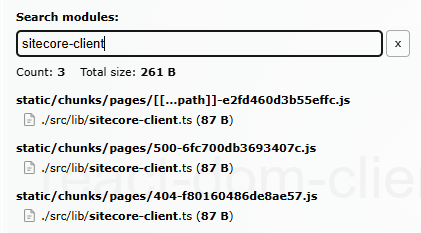
sitecore-clientRun your bundle analyzer (@next/bundle-analyzer or next build with analysis enabled) and open the client treemap. The browser bundle is the only one that matters here; ignore the server and edge maps.
Search the treemap for sitecore-client (or wherever your solution constructs SitecoreClient), and for the SDK's client modules generally. If they appear in any client chunk, some component is dragging them in. The treemap shows which chunk, which tells you which route or shared bundle. From there, follow the imports.
After next build, search the output for your actual Context ID value. Expected result: zero matches. This catches anything the treemap approach missed, including the value arriving through a different variable name or being inlined somewhere unexpected.
Delete NEXT_PUBLIC_SITECORE_EDGE_CONTEXT_ID from .env and run the app. Every failure is a leak announcing itself, and the stack trace is a map. Read it bottom-up to get the exact import chain from page to leaking module:
[browser] Error: Invalid GraphQL endpoint '/api/graphql'.
Verify that appropriate environment variable is set
    at eval (src\lib\sitecore-client.ts:4:16)
    at ./src/components/content-sdk/SitecoreStyles.tsx
    at ./src/Layout.tsx
    at ./src/pages/[[...path]].tsx
Note pages-dir-browser in the full frames: the module executed in the browser. The error does not mean the public variable is required, it means a component is constructing a Sitecore client in the browser.
For each leak, the question is whether the browser actually needs Sitecore data at that point:
getStaticProps/layout data, where the private SITECORE_EDGE_CONTEXT_ID legitimately lives, and pass the result down as props. The browser receives data, never the credential.Edge still means all published content.A fresh copy of the SitecoreAI starter kit fails check #3 out of the box. The chain is [[...path]].tsx → Layout.tsx → SitecoreStyles.tsx → sitecore-client.ts, which constructs SitecoreClient at module scope. SitecoreStyles loads the stylesheets behind Pages/Design Library content styling — client-side.
The fix follows the pattern above. If you build custom components with your own design system and don't use that styling feature, remove SitecoreStyles from Layout.tsx and the browser-side client is gone. If you do use it, resolve the stylesheet link server-side and pass the URL as a prop, and the browser gets a <>tag instead of a credential.
After the changes, test Pages editing mode. It communicates with the rendering host through the editing secret and server-side rendering, so it should be unaffected, but verify rather than assume.
Treat the Context ID as a server-side secret. Verify it stays that way with the bundle analyzer (no sitecore-client in the client treemap), a search of the build output, and a run without the public variable. The starter kit itself fails these checks through one component — fix it on day one, and add the analyzer check to your PR pipeline so the leak doesn't come back.