Reading time: 5 min read
How to Fully Turn Off Sitecore PaaS Azure App Services
Your app service are NOT fully stopped, learn a quick way to fully stop them
Start typing to search...
We recently worked on an interesting project for one of our clients where they wanted to optimize their XP platform and save some $$$ cash. There are ways you can approach this by either grouping up XP related resources or even better and covert the XP instance into XM, which we ended up doing. Our team did the analysis and ended up finding that the client is not fully taking advantage of the XP platform and its better that they switch to XM.
During our implementation phase we found that even after stripping out/stopping everything that is related to XP i.e code, app services and databases, there was still something which was trying to log into the XP related databases. We constantly received the following two errors in our application insight logs almost every 10 seconds.
processingengineuser.xcsmmuser.Exception 1:
MessageType: Error Picking Processing Task, Message: Login failed for user 'processingengineuser'.
System.Data.SqlClient.SqlException:
at System.Data.SqlClient.SqlInternalConnectionTds..ctor (System.Data, Version=4.0.0.0, Culture=neutral, PublicKeyToken=b77a5c561934e089)
at System.Data.SqlClient.SqlConnectionFactory.CreateConnection (System.Data, Version=4.0.0.0, Culture=neutral, PublicKeyToken=b77a5c561934e089)
at System.Data.ProviderBase.DbConnectionFactory.CreatePooledConnection (System.Data, Version=4.0.0.0, Culture=neutral, PublicKeyToken=b77a5c561934e089)
at System.Data.ProviderBase.DbConnectionPool.CreateObject (System.Data, Version=4.0.0.0, Culture=neutral, PublicKeyToken=b77a5c561934e089)
at System.Data.ProviderBase.DbConnectionPool.UserCreateRequest (System.Data, Version=4.0.0.0, Culture=neutral, PublicKeyToken=b77a5c561934e089)
at System.Data.ProviderBase.DbConnectionPool.TryGetConnection (System.Data, Version=4.0.0.0, Culture=neutral, PublicKeyToken=b77a5c561934e089)
at System.Data.ProviderBase.DbConnectionPool.WaitForPendingOpen (System.Data, Version=4.0.0.0, Culture=neutral, PublicKeyToken=b77a5c561934e089)
at System.Runtime.ExceptionServices.ExceptionDispatchInfo.Throw (mscorlib, Version=4.0.0.0, Culture=neutral, PublicKeyToken=b77a5c561934e089)
at System.Runtime.CompilerServices.TaskAwaiter.HandleNonSuccessAndDebuggerNotification (mscorlib, Version=4.0.0.0, Culture=neutral, PublicKeyToken=b77a5c561934e089)
at Sitecore.Framework.TransientFaultHandling.Sql.SqlRetryHelper+<>c__DisplayClass18_0+<<OpenAsync>b__0>d.MoveNext (Sitecore.Framework.TransientFaultHandling.Sql, Version=2.2.0.0, Culture=neutral, PublicKeyToken=null)
at System.Runtime.ExceptionServices.ExceptionDispatchInfo.Throw (mscorlib, Version=4.0.0.0, Culture=neutral, PublicKeyToken=b77a5c561934e089)
at System.Runtime.CompilerServices.TaskAwaiter.HandleNonSuccessAndDebuggerNotification (mscorlib, Version=4.0.0.0, Culture=neutral, PublicKeyToken=b77a5c561934e089)
at Sitecore.Processing.Tasks.Sql.SqlTaskDataProvider+<ExecuteReaderRoutine>d__22`1.MoveNext (Sitecore.Processing.Tasks.Sql, Version=3.0.0.0, Culture=neutral, PublicKeyToken=null)
at System.Runtime.ExceptionServices.ExceptionDispatchInfo.Throw (mscorlib, Version=4.0.0.0, Culture=neutral, PublicKeyToken=b77a5c561934e089)
at System.Runtime.CompilerServices.TaskAwaiter.HandleNonSuccessAndDebuggerNotification (mscorlib, Version=4.0.0.0, Culture=neutral, PublicKeyToken=b77a5c561934e089)
at Sitecore.Processing.Tasks.Sql.SqlTaskDataProvider+<ExecuteReadTaskRoutine>d__21.MoveNext (Sitecore.Processing.Tasks.Sql, Version=3.0.0.0, Culture=neutral, PublicKeyToken=null)
at System.Runtime.ExceptionServices.ExceptionDispatchInfo.Throw (mscorlib, Version=4.0.0.0, Culture=neutral, PublicKeyToken=b77a5c561934e089)
at System.Runtime.CompilerServices.TaskAwaiter.HandleNonSuccessAndDebuggerNotification (mscorlib, Version=4.0.0.0, Culture=neutral, PublicKeyToken=b77a5c561934e089)
at Sitecore.Processing.Tasks.Sql.SqlTaskDataProvider+<PickDistributedTaskInProgressAsync>d__10.MoveNext (Sitecore.Processing.Tasks.Sql, Version=3.0.0.0, Culture=neutral, PublicKeyToken=null)
at System.Runtime.ExceptionServices.ExceptionDispatchInfo.Throw (mscorlib, Version=4.0.0.0, Culture=neutral, PublicKeyToken=b77a5c561934e089)
at System.Runtime.CompilerServices.TaskAwaiter.HandleNonSuccessAndDebuggerNotification (mscorlib, Version=4.0.0.0, Culture=neutral, PublicKeyToken=b77a5c561934e089)
at Sitecore.Processing.Engine.Diagnostics.TaskDataProviderCountersDecorator+<PickDistributedTaskInProgressAsync>d__5.MoveNext (Sitecore.Processing.Engine, Version=3.0.0.0, Culture=neutral, PublicKeyToken=null)
at System.Runtime.ExceptionServices.ExceptionDispatchInfo.Throw (mscorlib, Version=4.0.0.0, Culture=neutral, PublicKeyToken=b77a5c561934e089)
at System.Runtime.CompilerServices.TaskAwaiter.HandleNonSuccessAndDebuggerNotification (mscorlib, Version=4.0.0.0, Culture=neutral, PublicKeyToken=b77a5c561934e089)
at Sitecore.Processing.Engine.Agents.TaskAgent+<GetTaskDataAsync>d__7.MoveNext (Sitecore.Processing.Engine, Version=3.0.0.0, Culture=neutral, PublicKeyToken=null)
Exception 2:
Login failed for user 'xcsmmuser'.. The error occurred while attempting to perform the underlying storage operation during 'Microsoft.Azure.SqlDatabase.ElasticScale.ShardManagement.StoreException: Error occurred while performing store operation. See the inner SqlException for details. ---> System.Data.SqlClient.SqlException: Login failed for user 'xcsmmuser'.
Microsoft.Azure.SqlDatabase.ElasticScale.ShardManagement.ShardManagementException:
at Microsoft.Azure.SqlDatabase.ElasticScale.ShardManagement.StoreOperationGlobal.Do (Microsoft.Azure.SqlDatabase.ElasticScale.Client, Version=2.1.0.0, Culture=neutral, PublicKeyToken=null)
at Microsoft.Azure.SqlDatabase.ElasticScale.ShardManagement.ShardMapManagerFactory.GetSqlShardMapManager (Microsoft.Azure.SqlDatabase.ElasticScale.Client, Version=2.1.0.0, Culture=neutral, PublicKeyToken=null)
at Microsoft.Azure.SqlDatabase.ElasticScale.ShardManagement.ShardMapManagerFactory.TryGetSqlShardMapManager (Microsoft.Azure.SqlDatabase.ElasticScale.Client, Version=2.1.0.0, Culture=neutral, PublicKeyToken=null)
at Sitecore.Xdb.Collection.Data.SqlServer.Configuration.ElasticScaleConnectionManager.InitializeShardMapManager (Sitecore.Xdb.Collection.Data.SqlServer, Version=4.0.0.0, Culture=neutral, PublicKeyToken=null)
at Sitecore.Xdb.Collection.Data.SqlServer.Configuration.ElasticScaleConnectionManager.get_ShardMapManager (Sitecore.Xdb.Collection.Data.SqlServer, Version=4.0.0.0, Culture=neutral, PublicKeyToken=null)
at Sitecore.Xdb.Collection.Data.SqlServer.Configuration.ElasticScaleConnectionManager.GetRangeShardMap (Sitecore.Xdb.Collection.Data.SqlServer, Version=4.0.0.0, Culture=neutral, PublicKeyToken=null)
at Sitecore.Xdb.Collection.Data.SqlServer.Configuration.ElasticScaleConnectionManager+<>c__DisplayClass36_0.<GetShards>b__0 (Sitecore.Xdb.Collection.Data.SqlServer, Version=4.0.0.0, Culture=neutral, PublicKeyToken=null)
at System.Lazy`1.CreateValue (mscorlib, Version=4.0.0.0, Culture=neutral, PublicKeyToken=b77a5c561934e089)
at System.Lazy`1.LazyInitValue (mscorlib, Version=4.0.0.0, Culture=neutral, PublicKeyToken=b77a5c561934e089)
at Sitecore.Xdb.Collection.Data.SqlServer.Configuration.MemoryCacheManager.AddOrGetExistingFromCache (Sitecore.Xdb.Collection.Data.SqlServer, Version=4.0.0.0, Culture=neutral, PublicKeyToken=null)
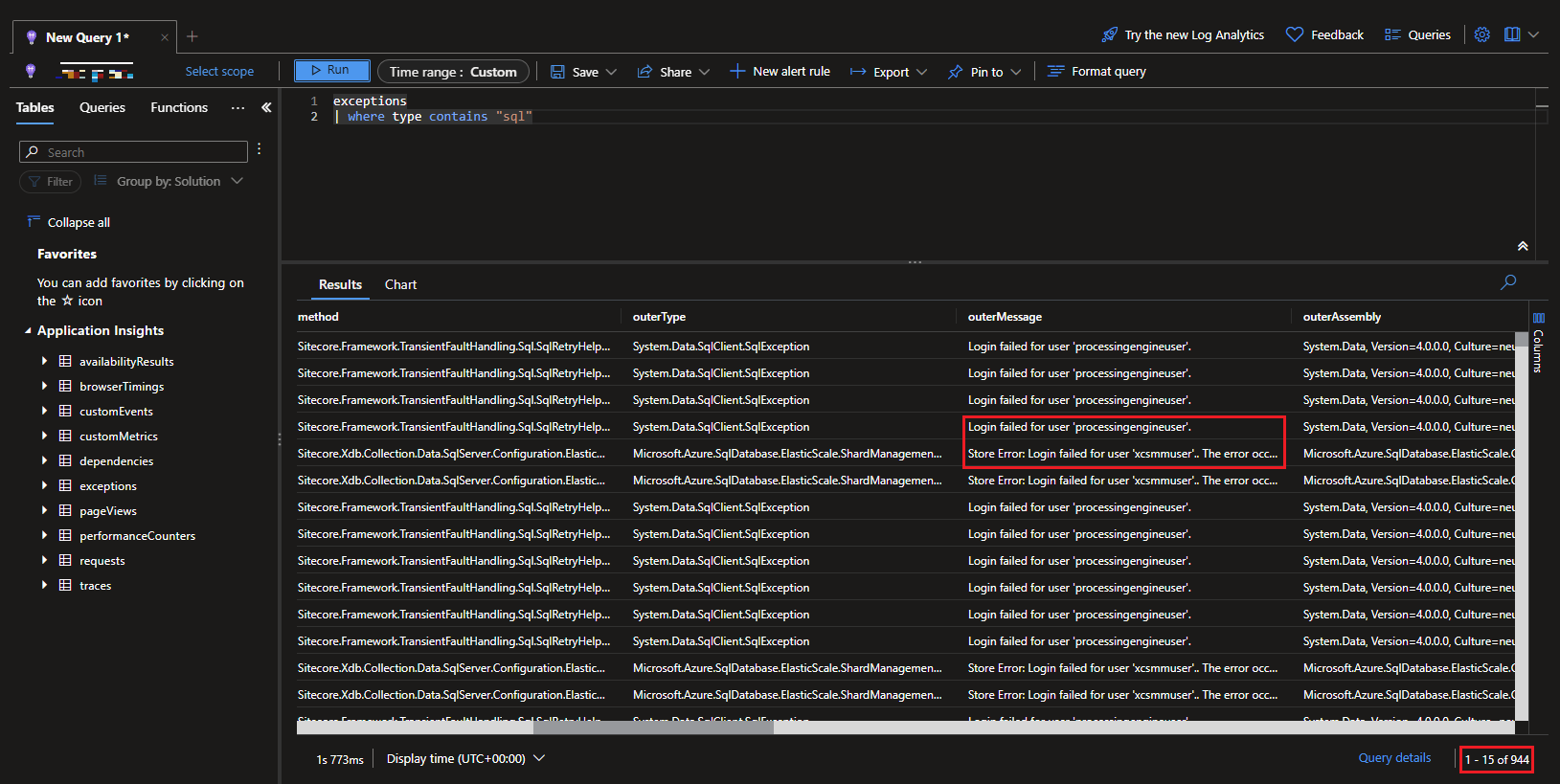
After some digging we found out that the app services (related to XP such as cortexprocessing, cortexreporting) even though they are stopped from the portal.azure.com were still making SQL calls because cortexprocessing still had WebJob for ProcessingEngine.exe running in the background. This happens because when you press Stop from the Portal it only stops the main site and not the scm site. SCM site is where Kudu and all the webjobs runs. So in order to fully stop the app services we also need to shutdown the scm site.
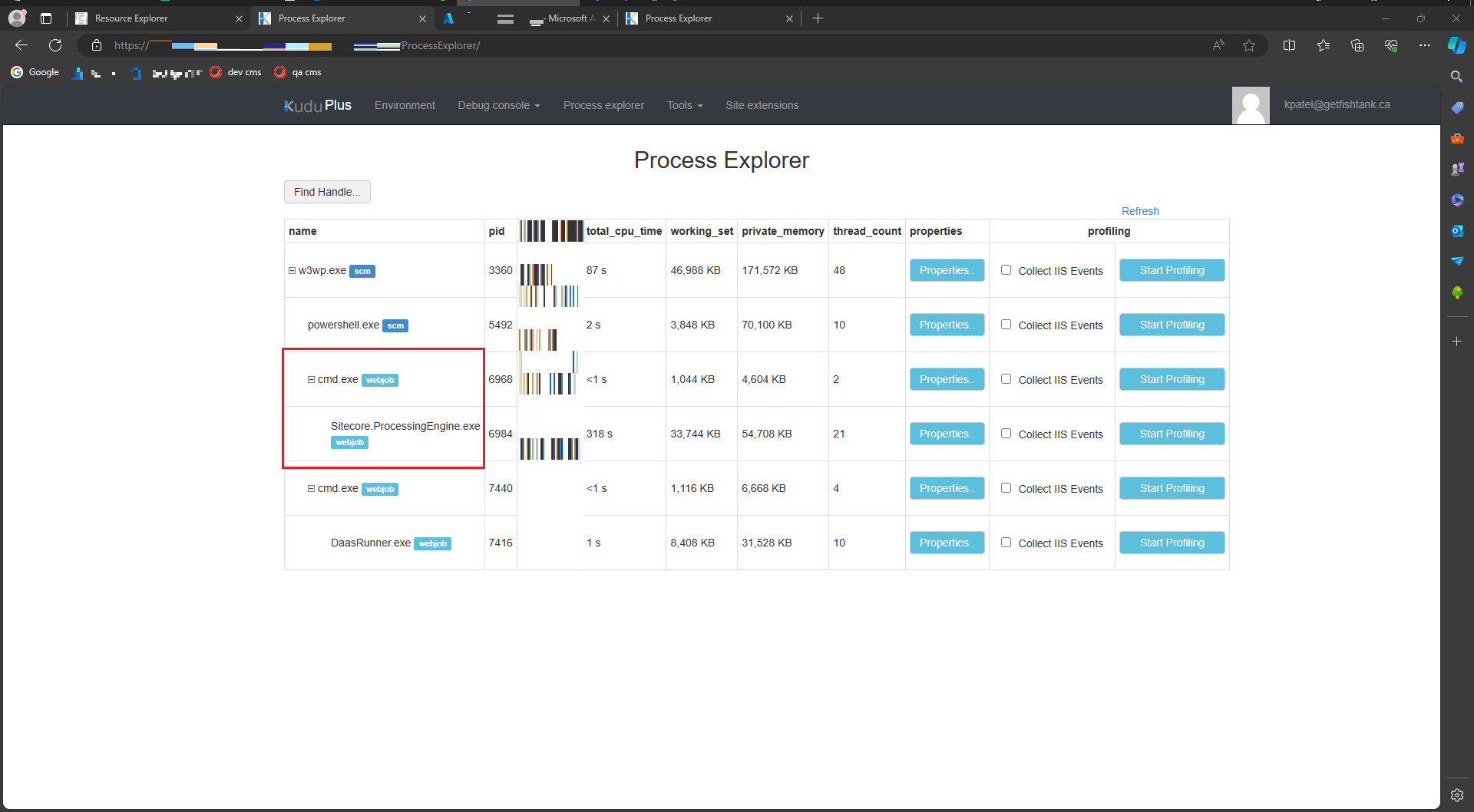
In order to stop both the main site and the scm site, do the following:
Read/Write and then Edit.state and set it to Stopped (skip this if you stopped the app service from Portal as it’ll be already in Stopped state)scmSiteAlsoStopped and set it true. PUT.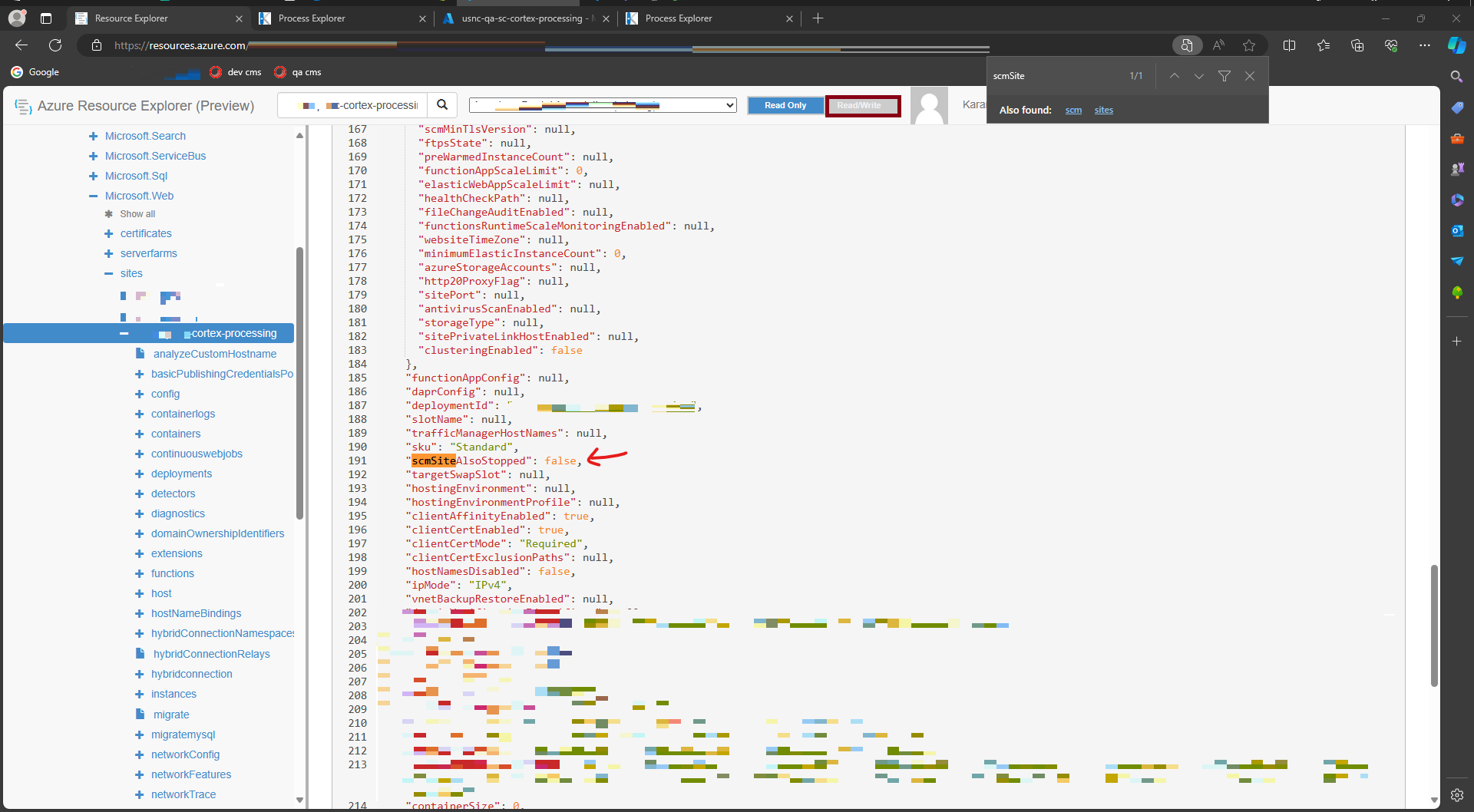
To verify if the scm site is stopped, try visiting Kudu for your web app and it should give you 403. As mentioned earlier scm site is where Kudu and WebJobs are running so stopping this will also stop Kudu from running.
That’s folks! We learnt step by step on how to fully stop an app service because when going through the portal it would only stop the main site and not the scm site. Also, its recommended that you group up the stopped app services and put it under a single app service plan to save money.