Reading time: 7 min read
Cleaning up orphaned items in SitecoreAI Experience Edge
Resolving stale content you can't see, still being served to production.
Start typing to search...
You delete a page in Sitecore. It disappears from the content tree, it disappears from your site, and as far as your content team is concerned, it's gone. Except it isn't. Its child pages are still sitting in Experience Edge, still answerable by a GraphQL query, still very much live on your delivery layer. No parent, no way to find them in the authoring UI, but there they are.
Those are orphaned items, and until you go looking, you'd never know they exist. Let's talk about how they happen, why you should care, and the admin tool that cleans them up.
Quick refresher first. Experience Edge is the GraphQL delivery layer that serves your published content to your head, whether that's your Next.js site, a mobile app, or anything else consuming the API. Content lands there when you publish, and it's supposed to leave when you unpublish or delete.
An orphaned item is one that's still published in Experience Edge after it should be gone. The classic version of the story goes like this:
The result is a child item that is stale and unreachable in authoring, but never actually removed from Edge. It just sits there, invisible to your authors and perfectly happy to answer a query.
Before we fix it, it's worth understanding how you get here, because it's easier to do than you'd think. Every one of these scenarios boils down to the same root cause: a child made it onto Edge while its parent did not. Here are the common ways that happens.
None of these are exotic. They're the kind of thing that happens on a busy project with multiple authors and developers all publishing throughout the day. Then, weeks later, someone deletes the parent to clean up, the cascade misses the stranded child, and now you've got a ghost.
Here's the encouraging part. A recent SitecoreAI platform fix addresses the situation that creates orphans in the first place. Per the SitecoreAI base image changelog, the issue where parent items weren't automatically published to Experience Edge, which is exactly what leaves child items stranded after the parent is deleted, has been fixed.
In plain terms, parents now get published to Edge alongside their children, so the "child on Edge without its parent" scenario is largely prevented going forward.
One thing worth being clear on, because it trips people up: this covers publishes that run through the standard publishing pipeline. That's your UI publishes, scheduled publishes, and programmatic publishes that go through PublishManager or the Publishing Service. If you push content straight to Edge yourself, bypassing the pipeline with a direct Edge API call or a custom integration, there's no pipeline running to pull the parent along, so the fix does nothing for you there. Same goes for any code that deliberately publishes a child in isolation. The rule of thumb: if your code publishes a child, make sure the parent chain goes up too. The fix reduces accidental orphans, it doesn't absolve you of thinking about ancestors. And as always, test the behaviour on your own version before you rely on it.
But, and this is the important part, that fix doesn't retroactively clean up the orphans you already have. If your environment has been running for a while, you almost certainly have a backlog. For those, you need the tool.
Sitecore ships an admin page built for exactly this job: find the orphans, review them, remove them. You'll find it at:
/sitecore/admin/EdgeOrphans.aspx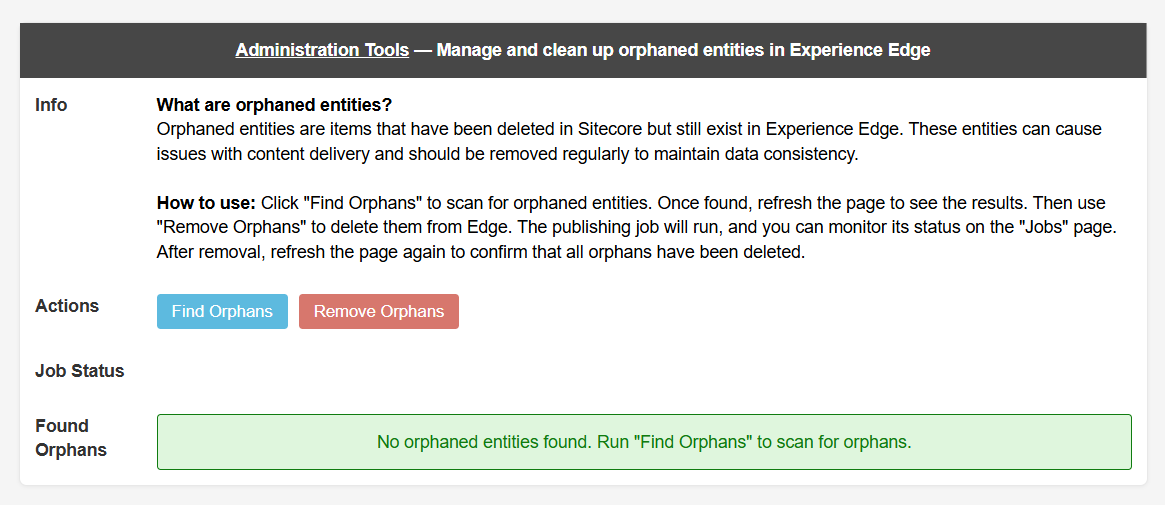
You'll need to be logged in as an administrator to use it. Here's the full flow.
/sitecore/admin/EdgeOrphans.aspx on your Content Management instance.Watch the job: The scan runs as a background job, so it won't finish instantly. You can track it over at /sitecore/admin/Jobs.aspx. Look for FindEdgeOrphansJob and wait for it to complete.
/sitecore/admin/Jobs.aspxEdgeOrphans.aspx and it'll list each orphaned item with its ID, Parent ID, Cultures, Type, and Path. Take a minute here. This is your chance to see exactly what's going to be removed before you touch anything.A couple of things trip people up here, so keep them in mind.
IMPORTANT: Always run Find Orphans immediately before Remove Orphans. It's a cheap habit that guarantees you're removing what's actually there right now, not what was there an hour ago.
Two things to walk away with. First, make sure you're on a base image that includes the parent auto-publish fix so you stop creating new orphans. Second, run EdgeOrphans.aspx once to clear out the backlog the fix won't touch, and then again after any big content restructure or bulk delete as a hygiene check.
It's the kind of problem that's completely invisible right up until it isn't. Ten minutes with this tool buys you the confidence that Edge is serving exactly what's in your tree, and nothing more.