Reading time: 11 min read
Tips to regenerate SitecoreAI Context IDs and API Tokens successfully
Procedures, incident response, and maintenance
Start typing to search...
Ensuring your site or your clients' site security is up-to-date and secure is always of utmost importance. If Sitecore XM Cloud (SitecoreAI / Sitecore Cloud Portal) Context IDs and API Tokens even potentially have been exposed, for example, through a leaked hosting provider environment like Vercel, an accidentally committed .env file, a screenshot in a ticket, or a former contributor retaining access, you need to react promptly, efficiently, and correctly. Failing to do so can be destructive.
First we will cover the steps to resolve the issues and then we will cover what you can do to prevent issues like this in the future and how you should react.
A Context ID identifies a specific Sitecore XM Cloud environment context. It's the binding between an environment, a site, and a delivery surface and is used by a headless app to fetch layout, content, dictionary, and personalization data from Sitecore Edge.
Typical environment variables (names vary slightly by template version, you can see the SitecoreAI Context ID env-var reference for the authoritative list) that may need to be listed as sensitive include the following:
SITECORE_EDGE_CONTEXT_ID - server-side, production / live edgeNEXT_PUBLIC_SITECORE_EDGE_CONTEXT_ID - client-exposed counterpart (Next.js bundles NEXT_PUBLIC_* into the browser JS at build time)SITECORE_API_KEY - older XM Cloud projects or those that haven't switched to Context ID usageA Context ID is not a username/password. Think of it more as a tenant identifier. On its own, it does not grant write access. However, an attacker holding a live Context ID can:
Treat Context IDs as moderately sensitive. Public app code paths leak them anyway (the browser eventually sees the live one), but the preview Context ID and any non-production Context IDs should be guarded.
API Tokens are the high-impact secret. In a typical Sitecore XM Cloud + headless stack you will see the following, each having different levels of access:
JSS_EDITING_SECRET / SITECORE_EDITING_SECRET): shared secret between the XM Cloud editing host and the headless preview deployment. An attacker with this can submit forged editing requests against the editing host.Treat any API Token as highly sensitive. Exposure = rotate now.
API Tokens for an SitecoreAI project are surfaced in the Deploy UI > Details tab for the relevant project / environment.
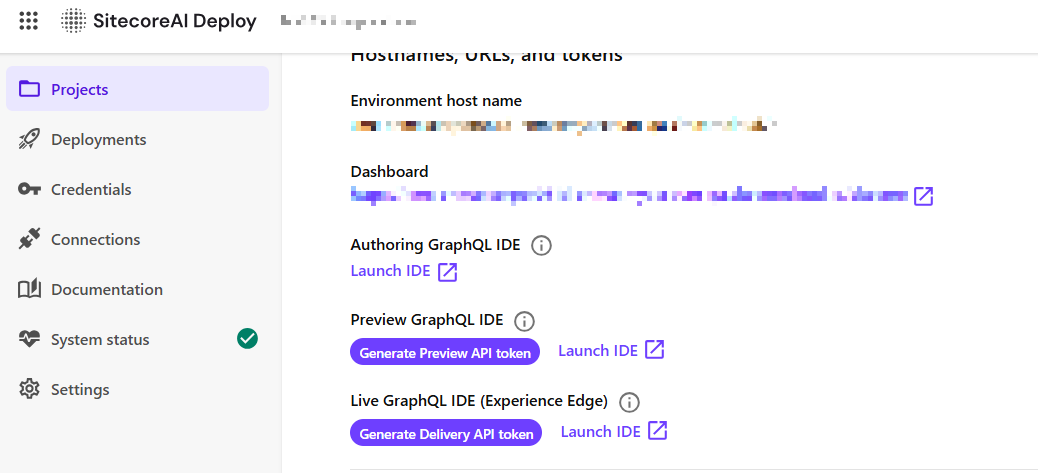
Revocation itself is performed through the Sitecore Token API. Using the Token API is what guarantees the token is invalidated server-side and can no longer be presented as a valid credential. See the endpoint reference: https://doc.sitecore.com/sai/en/developers/sitecoreai/experience-edge/experience-edge-apis/token-rest-api.html
I recommend revoking the old API Token first as in order to regenerate a Context ID it requires a an active Deploy API Token. It was discovered if you revoked a token and then tried to regenerate a Context ID this would fail. This issue has since been resolved, but it is why I recommend doing the API Token first to avoid issues in regeneration of the Context IDs.
IMPORTANT: If you were using an API Token, i.e. the Delivery API Token found on the Details tab of a project's environment. Revoking it will IMMEDIATELY create failures in all environments that use it.
Procedure:
Obtain Client ID and Client Secret values for the appropriate environment in the Credentials page of the SitecoreAI Deploy site.
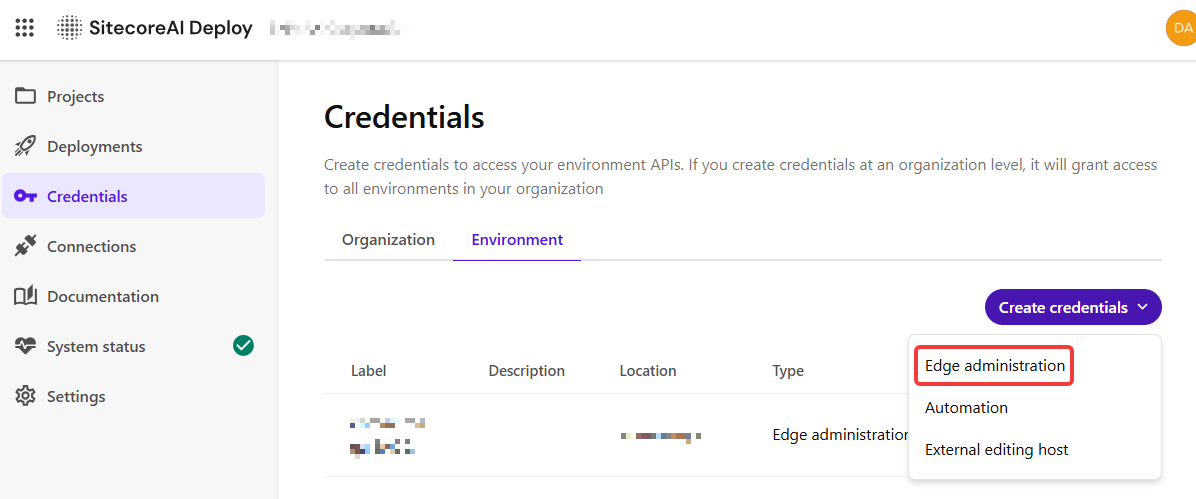
https://auth.sitecorecloud.io/oauth/token. Find details on how to get an auth token here: https://doc.sitecore.com/cdp/en/developers/api/request-an-access-token.htmlhttps://edge.sitecorecloud.io/api/apikey/v1/revokebytoken. You can find details of the parameters required here: https://doc.sitecore.com/sai/en/developers/sitecoreai/experience-edge/experience-edge-apis/token-rest-api.html#revokebytokenrevoke-token.sh (or equivalent) that wraps the API call and can be run during an incident without anyone having to look up curl syntax under pressure. This requires a multi-stage script, but could be handy for anyone to have.A good rule of thumb is any token that has been exposed or potentially exposed, not just confirmed-leaked, must go through this revoke flow. "We're not sure if it leaked" is a revoke condition, not a wait-and-see condition.
The editing secret is set in two places and both must change together:
JSS_EDITING_SECRET or SITECORE_EDITING_SECRET consumed by the editing route handler in the headless appMismatch will break editing in Sitecore Pages. Coordinate with whoever owns the Sitecore environment, set both, then redeploy.
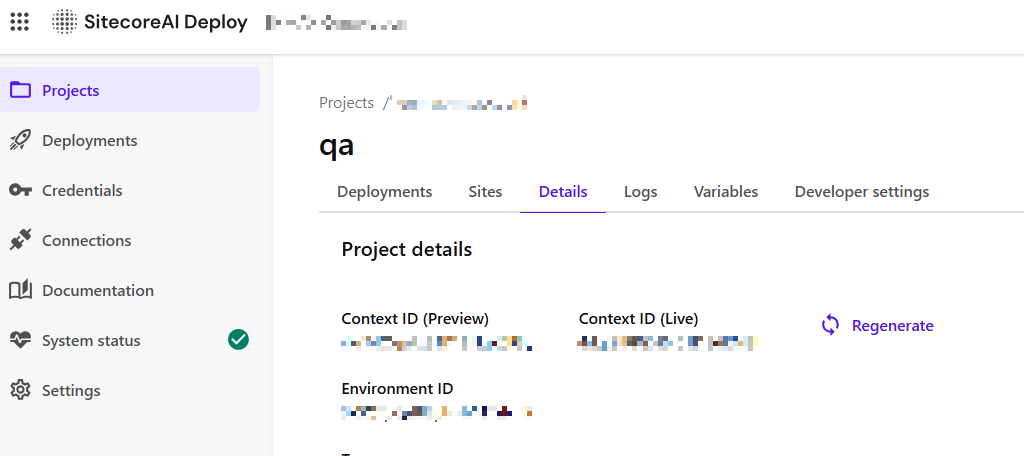
In order to regenerate it, you need to use the Deploy API, similar to how you did the API Token above. Let's follow the steps:
https://auth.sitecorecloud.io/oauth/token. Find details on how to get an auth token here: https://doc.sitecore.com/cdp/en/developers/api/request-an-access-token.htmlregenerate-editing-secret endpoint using the JWT and the environmentId found on the Deploy UI > Details page. You can find the POST command here: https://xmclouddeploy-api.sitecorecloud.io/swagger/index.html#/Environments/RegenerateEditingSecretKey It involves performing a POST command to: https://xmclouddeploy-api.sitecorecloud.io/api/environments/v1/{environmentId}/regenerate-editing-secretContext IDs are issued per environment and come in two variants. You can find them in the Deploy interface.
After rotation, every developer needs to update local .env.local (and per-environment files such as .env.qa, .env.staging). Communicate the rotation through a secret manager, but please, do not paste the new value in chat.
There are always things you can do to improve security around Context IDs, API Tokens, etc. Scoping Context IDs are but one way when you need to use them in precarious locations.
Any env var with a public-build prefix is bundled into the browser JavaScript at build time and is therefore visible to anyone who opens DevTools. The most common offender is NEXT_PUBLIC_SITECORE_EDGE_CONTEXT_ID. Any variable starting with NEXT_PUBLIC_* is always available in the front-end client bundles and in older versions of SitecoreAI, people needed to use the Context ID for NEXT_PUBLIC_ to ensure analytics worked. This has since been rectified to allow you to use multiple Context IDs for various purposes.
These are not "leaked", they are public by design. The mitigation is not to hide the value but to limit what it can do. Sitecore Cloud Portal supports this by letting you create a scoped Context ID. What that is, is a Context ID that is restricted to a specific allow-list of origins (and optionally other constraints), so that even when the value is read out of the client bundle by a third party, it cannot be used from unauthorized domains.
Rule: the un-scoped (default) Context ID should never be the value placed in a NEXT_PUBLIC_* (or other client-exposed) variable. Use a scoped Context ID for every surface where the value will reach the browser.
Recommended pattern after a rotation:
NEXT_PUBLIC_SITECORE_EDGE_CONTEXT_ID, etc.).For the click-through steps to create a scoped Context ID, see the official Sitecore documentation: https://doc.sitecore.com/portal/en/developers/sitecore-cloud-portal/manage-context-ids.html#create-a-scoped-context-id
The portal UI changes from time to time so always cross-reference the live documentation rather than relying on a screenshot in an internal wiki.
A typical exposure: a hosting provider project was set to public, a preview link was shared too widely, env vars were viewable to a wider audience than intended, or a .env file was committed.
The example below uses Vercel terminology, but the same playbook applies to Netlify, Azure App Service, AWS Amplify, Cloudflare Pages, or any other host that stores environment variables.
| Scenario | Context ID | API Token |
|---|---|---|
| Committed to git history (any branch, any time) | Rotate | Rotate immediately |
| Pasted in Slack/Teams/email/ticket | Consider rotating | Rotate |
| Visible in a screenshot shared externally | Consider rotating | Rotate |
| Hosting provider env vars exposed (e.g. public Vercel project, leaked Netlify dashboard, misconfigured Azure App Service) | Rotate | Rotate immediately |
| Contractor or employee with access has left | Optional | Rotate |
| Unknown — "I think it might have leaked" | Rotate | Rotate |
| Routine hygiene | Annually | Every 90 days, or per policy |
Rule of thumb: if you are debating whether to rotate an API token, rotate it. The cost of rotation is one deploy, potentially a short outage. The cost of a missed rotation is unbounded.
Time-to-rotate budgets, from the moment exposure is suspected:
gitleaks, TruffleHog) so the same shape never enters git again.Run this quarterly:
.env* files in git history (git log --all --full-history -- "*.env*")