Loading component...

Published on January 31, 2023Reading time: 5 min read

Quick Guide to IaaS, PaaS, and SaaS

Almost everything you need to know about the primary as-a-service cloud computing business models.

Loading component...

Related Articles

SitecoreAI

Sitecore Workflow Automation with Management API

A practical guide to managing Sitecore workflows programmatically using the Management GraphQL API with production-tested patterns.

November 20, 20251 min read
Blog Card Placeholder
Dev

How to Create a New Sitecore SXA Headless Site

SXA Headless is easy, awesome and powerful! Learn how to create your first Sitecore Headless Tenant & Site with SXA.

November 19, 20251 min read

Loading component...

Digital solutions

Learn how to maximize your investment in Sitecore by working with us.

AI solutions

Dominate your industry. Work with us to digitally transform your business.

Fishtank's proprietary project accelerator. Save time and money. Build what matters.

Utilities

Energy

Education

Healthcare

Manufacturing

Professional services

Financial services

Non-profits and associations

About FishtankThe PlaybookSitecore SnackContact us

Solutions

  • Digital solutions
  • AI solutions
  • TIDAL for XM Cloud

About

  • About Fishtank
  • The Playbook
  • Sitecore Snack
  • Contact us

Insights

Work

Industries

  • Utilities
  • Energy
  • Education
  • Healthcare
  • Manufacturing
  • Professional services
  • Financial services
  • Non-profits and associations

Start typing to search...

As-a-service (-aaS or AAS) are business models in which something is provided to customers (either internally or externally) as a service. Primarily, AAS offerings are focused on services delivered via the cloud. In this blog, we’re only going to explore three types of AAS offerings, but many more exist, including:

  • Anything / Everything-as-a-service (XaaS): A general category of cloud computing and remote access services. SaaS, PaaS, and IaaS are all examples of XaaS.
  • Function-as-a-service (FaaS): A type of cloud computing that allows users to run individual functions or pieces of code without needing to manage the entire application or infrastructure.
  • Containers-as-a-service (CaaS): Helps IT departments and software developers manage and deploy apps using container-based virtualization. (FYI: There are multiple definitions of CaaS, including commerce-as-a-service, content-as-a-service, communications-as-a-service, etc.)

For a near complete list of AAS offerings, check out this big -aaS list from Ryan LaFlamme.

What’s the Difference Between IaaS, PaaS, and SaaS?

IaaS, PaaS, and SaaS are cloud computing services that offer an alternative to on-premise IT solutions (where data, apps, and software run on in-house computer servers). On-premise (or on-prem) solutions are a rarity nowadays, but think of the olden days of Adobe InDesign on CD-ROM.

The graphic below provides a high-level overview of the primary differences between IaaS, PaaS, and SaaS from an IT perspective (i.e., this is primarily for the techies. All others to see layman's terms below).
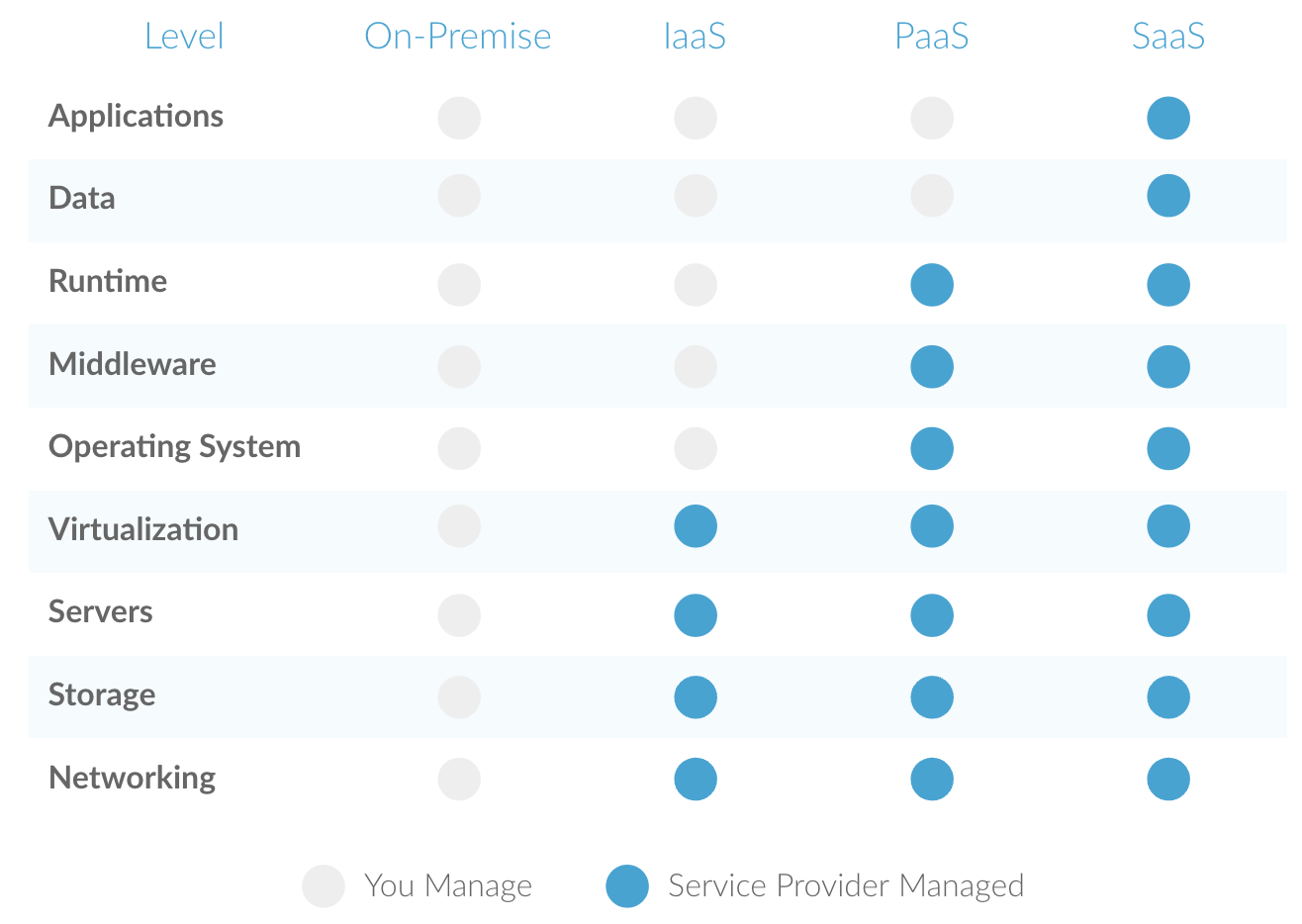
Table comparing IaaS vs SaaS vs PaaS

Information-As-A-Service (IaaS)

What is IaaS?

IaaS is a type of cloud computing that provides users with access to computing resources, like servers, storage, and networking. It allows users to rent these resources on a pay-as-you-go basis, so they don't need to invest in hardware or software upfront. IaaS customers have full control over the virtual machines and can install and configure their own software and applications.

Who uses IaaS?

  • Architects
  • Developers
  • IT administrators

What are examples of IaaS?

  • Amazon Web Services (AWS)
  • Rackspace
  • Microsoft Azure
  • Google Compute Engine (GCE)

What are the benefits of IaaS?

  • You only pay for what you need
  • Users can quickly scale up or down based on your organization’s requirements
  • Users retain complete control over infrastructure
  • Highly flexible and easy to expand
  • Automated deployment of servers, storage, and networking
  • Dynamic workloads are supported

What are the limitations of IaaS?

  • Requires a certain level of technical knowledge to set up and manage (often equalling additional training)
  • Legacy systems may have to be upgraded or enhanced
  • Organizations are responsible for mitigating security risks

Platform-As-A-Service (PaaS)

What is PaaS?

PaaS is a cloud computing model in which customers can develop, run, and manage web applications without having to worry about the underlying infrastructure. PaaS provides customers a platform to build and deploy applications quickly and easily.

Who uses PaaS?

  • Developers
  • Programmers

What are examples of PaaS?

  • Google search engine
  • Microsoft Azure
  • Salesforce’s Customer 360 platform 

Sitecore's PaaS Products:

  • Experience Commerce (XC)
  • Experience Platform (XP)
  • Experience Manager (XM)

What are the benefits of PaaS?

  • Easy to customize and update
  • High level of cross-developer collaboration
  • Faster development and deployment
  • Developers don’t have to manage software (aka more time to dedicate to other priorities)
  • Requires less coding than other models

What are the limitations of PaaS?

  • Users only have control over the code, and not the infrastructure
  • The solution may not be optimized for the language or framework your developers use
  • Security risks due to third-party vendor-controlled servers 

Software-As-A-Service (SaaS)

What is SaaS?

SaaS is a cloud computing model in which software applications are hosted on a remote server, and customers access them through a web browser. SaaS eliminates the need for customers to install and manage the software on their own systems.

Who uses SaaS?

  • End users (i.e., consumers)

What are examples of SaaS?

  • Slack
  • Netflix
  • Gmail
  • Office 365 

Sitecore's SaaS Products:

  • XM Cloud
  • Content Hub DAM
  • Sitecore Personalize
  • Sitecore Send
  • Sitecore CDP
  • Sitecore Discover
  • Sitecore OrderCloud

What are the benefits of SaaS?

  • Easy to use and no installs or downloads required
  • Eliminates the need for users to maintain and manage software
  • Automatic updates (so you always have the right version)
  • Offers marketers increased speed to market and reduced friction (for Sitecore SaaS solutions specifically. Say that 10 times fast.)
  • Highly scalable
  • Typically a lower cost of ownership, especially as compared to on-prem software 

What are the limitations of SaaS?

  • Requires a reliable internet connection
  • No control over infrastructure (meaning if the provider has an outage, so do you)
  • Lack of integration support
  • Some tools may be incompatible with your current tech stack
  • Security risks due to a reliance on off-premise servers (if a leak happens, your data may be exposed)
  • Limited customization options 

In Summary

Each cloud computing model provides different levels of access to cloud resources and capabilities and can be used for different types of applications. As each serves a distinct purpose, it's essential to determine your business needs to ensure your chosen cloud services provide value.

Have any questions regarding Sitecore’s SaaS and PaaS products? Let us know.

Solutions

  • Digital solutions
  • AI solutions

Brands

  • TIDAL for SitecoreAI
  • Sitecore Snack
  • The Playbook

Fishtank lore

  • Work
  • Insights
  • About us
  • Contact us

Industries

Utilities
Professional services
Energy
Financial services
Healthcare
Education
Non-profits and associations
Manufacturing
Utilities
Professional services
Energy
Financial services
Healthcare
Education
Non-profits and associations
Manufacturing

2025 @All Rights Reserved. Privacy Policy.

FISHTANK